Modern transport protocols make a site faster without you touching a single line of content — but only if they’re actually switched on. Most owners never check. Here’s how to confirm each one, and what to do if it’s missing.
h2) and HTTP/3 (h3), a response’s content-encoding: br for Brotli, an online IPv6 test for a working AAAA listener, an SSL/TLS report for the TLS version, and a security-header scan for the Strict-Transport-Security (HSTS) header. Every gap you find is usually one toggle away from fixed.Between your visitor’s browser and your content sit a stack of protocols that decide how quickly bytes arrive: the HTTP version, whether connections use the newer QUIC transport, whether modern compression is applied, and how the connection is secured. Good hosts enable these by default; plenty of sites still run on older defaults and leave measurable speed on the table. The good news is that every one of them is verifiable in a couple of minutes, and most are a host-side toggle rather than a rebuild.
Record what you serve today, before changing anything. Without it you cannot prove a gain.
HTTP/2 multiplexes over one connection. HTTP/3 moves that to QUIC, over UDP. Test both, not one.
IPv6 is served or it is not. An AAAA record with nothing listening behind it is worse than none.
Brotli beats gzip on text. Check the TLS version you negotiate, not the one you support.
HSTS keeps browsers on HTTPS only. Add the header once TLS is solid on every subdomain.
A protocol you believe you support and do not is the expensive case: it looks done on the roadmap and is absent on the wire.
Table of Contents
First, take a baseline
Before changing anything, record where you stand. Run a page-speed report (PageSpeed Insights or GTmetrix from the free tools kit), note the scores and the largest opportunities, and save a screenshot. A baseline turns “the site feels faster” into “the score moved from X to Y,” and it tells you whether a protocol change actually helped. Re-run the same report after each change, one at a time, so you know what did the work.
HTTP/2 — connection multiplexing
What it is: the successor to HTTP/1.1. It sends many requests over a single connection at once (multiplexing) instead of queuing them, which removes a major source of front-end latency on resource-heavy pages.
How to check: open your browser’s developer tools, go to the Network tab, reload the page, and add the “Protocol” column — it will read h2 for HTTP/2. Online protocol testers (for example Geekflare’s HTTP/2 test) report the same thing without devtools.
How to enable: it’s almost always a server or host setting, not something in WordPress. On managed hosting it’s usually on already; if not, the support team can enable it. It requires HTTPS, so make sure your certificate is in place first.
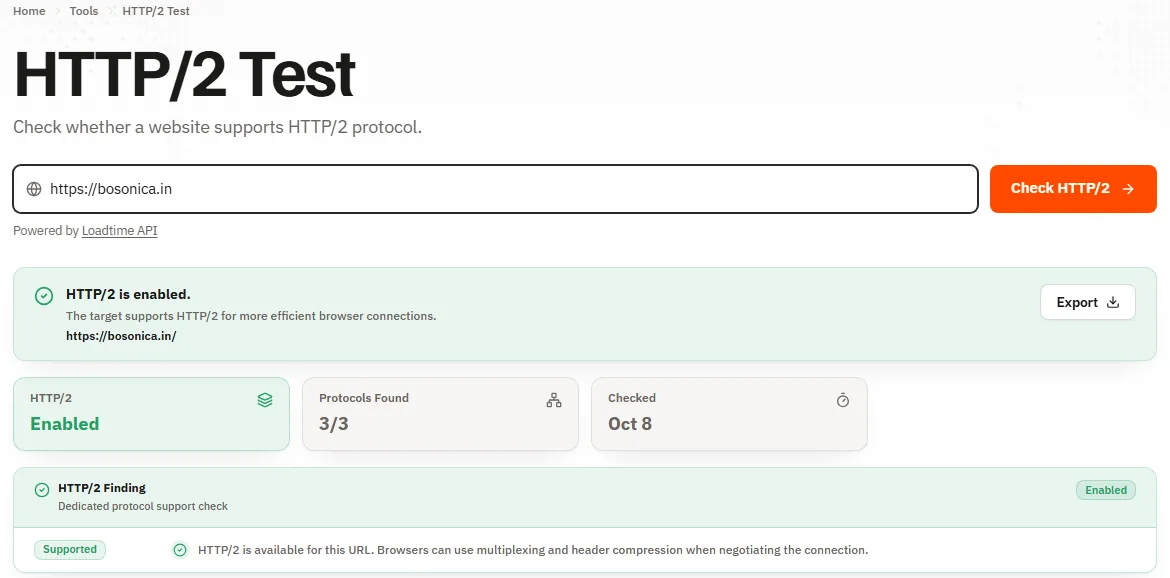
HTTP/2 removes a major source of front-end latency by sending many requests over one connection at once.
HTTP/3 — the QUIC transport
What it is: the newest version, built on QUIC (which runs over UDP) instead of TCP. It removes connection-setup round trips and handles packet loss far better, which especially helps visitors on mobile or flaky networks.
How to check: the same Network-tab Protocol column shows h3 once your browser and the server have negotiated it (browsers often connect over HTTP/2 first, then upgrade). Online HTTP/3 testers (such as HTTP/3 Check) confirm support directly.
How to enable: a host/CDN feature. Providers with a modern edge network typically offer a single toggle; older stacks may not support it yet. It’s a nice-to-have on top of HTTP/2, not a substitute for the basics.
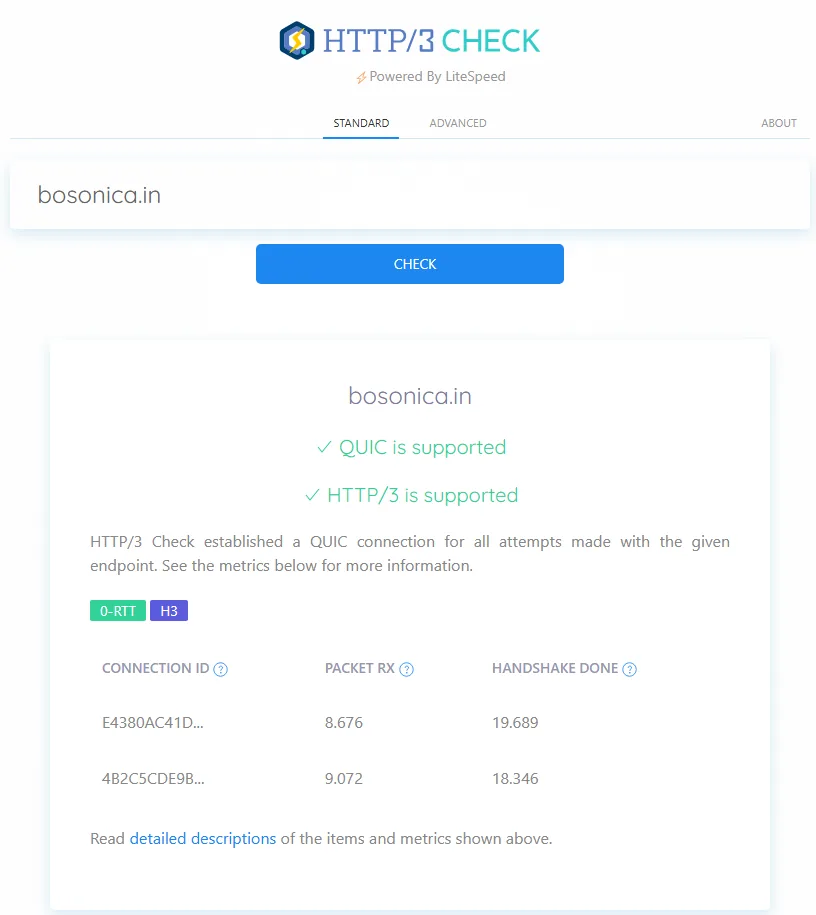
IPv6 — addressing for the modern internet
What it is: the current internet addressing scheme, alongside the older IPv4. Serving your site over IPv6 gives visitors on IPv6-only or IPv6-preferred networks a direct route instead of a translation hop.
How to check: an online IPv6 test for your domain — internet.nl checks this alongside DNSSEC and TLS — will report whether an AAAA DNS record exists and resolves. No AAAA record means no IPv6.
How to enable: add the AAAA record your host provides to your DNS. Many hosts and CDNs handle this automatically once enabled; some require you to add the record yourself.
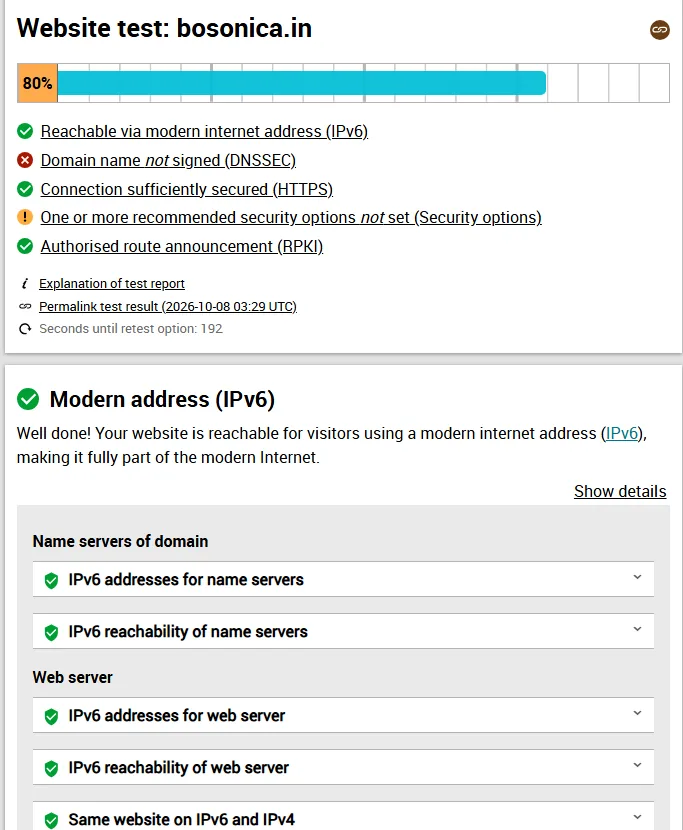
Serving your site over IPv6 gives visitors on IPv6-only networks a direct route instead of a translation hop.
Brotli — modern compression
What it is: a compression method that typically shrinks text assets (HTML, CSS, JavaScript) more than the older gzip, so less data travels to the browser. Smaller transfers mean faster loads, particularly on slower connections.
How to check: in the Network tab, click a text asset and look at the response headers for content-encoding: br. If it says gzip, you’re on the older method; if it’s absent, the asset isn’t compressed at all. An online Gzip/Brotli test reports the same without devtools.
How to enable: a server or CDN setting. Most modern hosts and caching layers offer Brotli as a toggle; enabling it is one of the cheaper transfer-size wins available. A newer method, Zstandard (content-encoding: zstd), is starting to appear in browsers and CDNs and compresses comparably; if your stack offers it, it’s a bonus — but Brotli is the one to make sure of first.
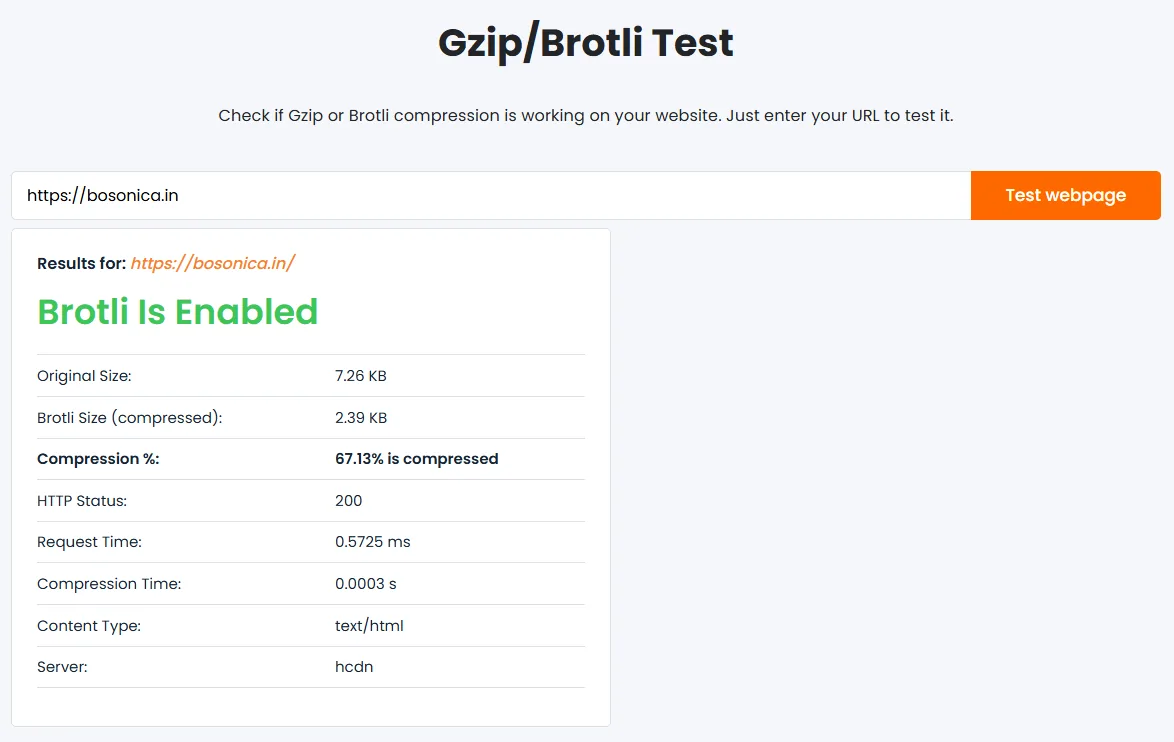
TLS / HTTPS — the secure foundation
What it is: the encryption that makes a connection HTTPS. Beyond privacy and trust, it’s now a prerequisite: HTTP/2 and HTTP/3 both require it, and browsers flag plain-HTTP sites as “not secure.”
How to check: load the site and confirm the padlock and an https:// address. For a thorough report — protocol versions, certificate chain, weak-cipher warnings — run an SSL/TLS testing service against your domain; it grades the configuration, not just “is there a certificate.” Aim to negotiate TLS 1.3 (with 1.2 still allowed for older clients); the report flags anything older, or a weak cipher, as a downgrade in the grade.
How to enable: most hosts issue free automated certificates, or you can obtain one with a free certificate tool. Once HTTPS is live, redirect all HTTP traffic to it so there’s a single canonical, secure address.
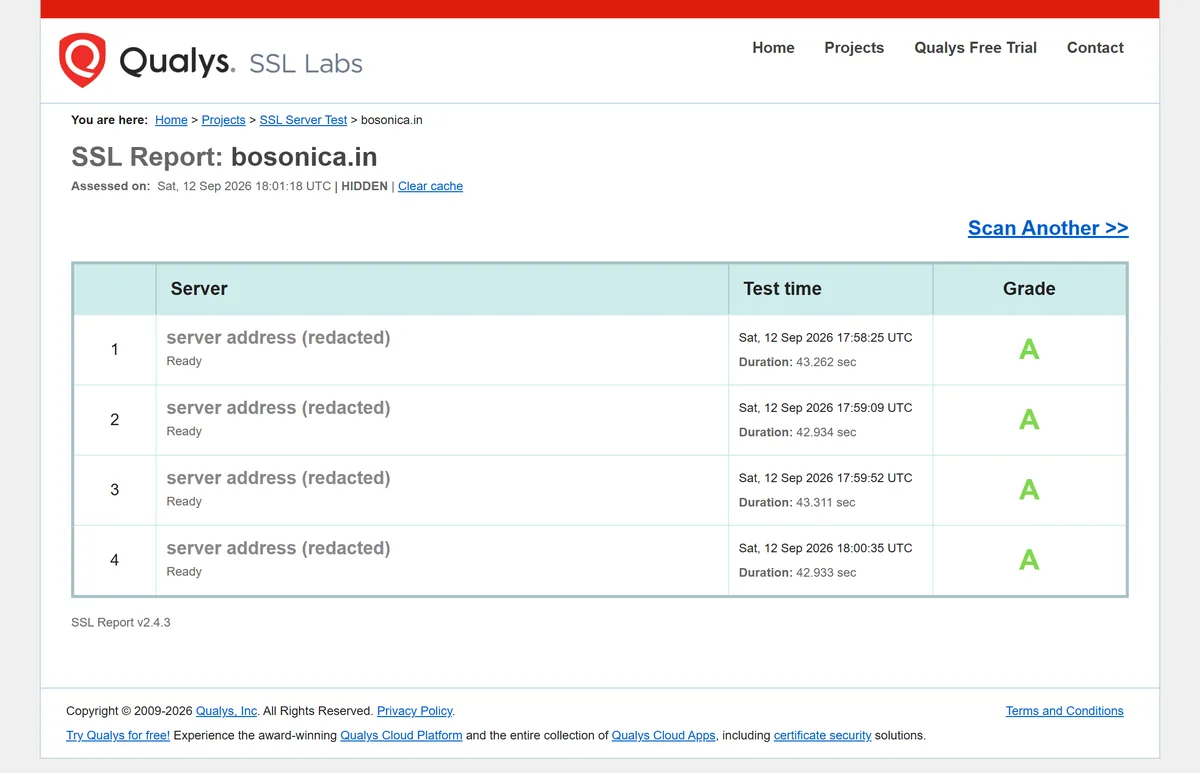
HTTP/2 and HTTP/3 both require HTTPS, and browsers flag plain-HTTP sites as not secure.
HSTS — enforce HTTPS after the first visit
What it is: HTTP Strict Transport Security is a response header (Strict-Transport-Security) that tells browsers to reach your site over HTTPS only, for a duration you set — even if a visitor types http:// or follows an old insecure link. It closes the small window between that first plain-HTTP request and the redirect to HTTPS, which is exactly where a downgrade attack can slip in. It’s the natural step after the TLS section above: TLS makes HTTPS available, HSTS makes it mandatory.
How to check: load any page and look for a Strict-Transport-Security response header — in the Network tab, or with a security-header scanner such as securityheaders.com. No such header means HSTS is off, and the site is one insecure redirect away from a downgrade.
How to enable: add the header at the server, host or CDN — Strict-Transport-Security: max-age=31536000; includeSubDomains. Start with a short max-age while you confirm every subdomain works over HTTPS, then raise it. Only add preload (and submit to the browser preload list) once you’re certain, because that is deliberately hard to undo. HSTS assumes HTTPS is already solid, so enable it after, not instead of, the TLS work above.
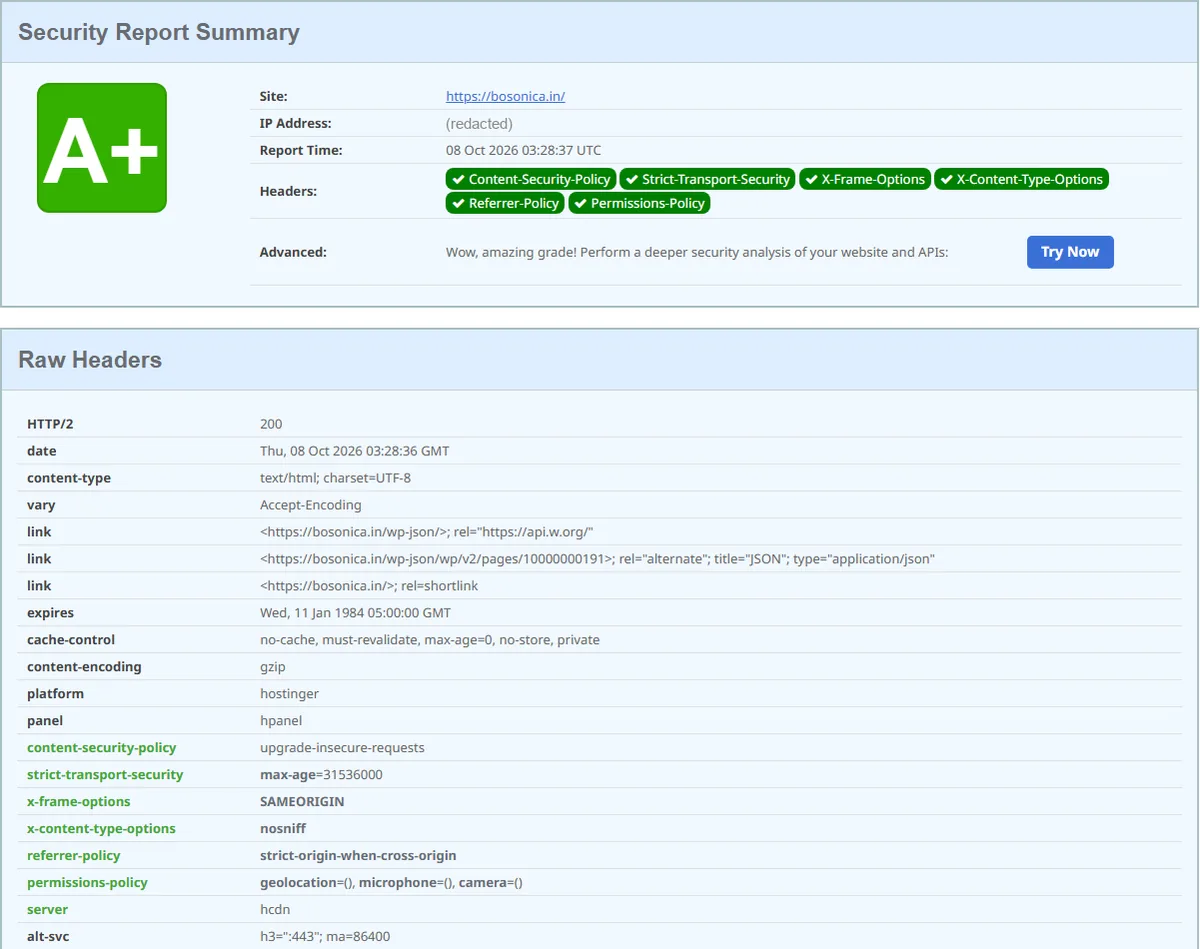
HSTS closes the small insecure window between a visitor’s first HTTP request and the redirect to HTTPS.
Put it together
A five-minute audit: open devtools on your home page and read the Protocol column and a text asset’s content-encoding; run an IPv6 test, an SSL/TLS test, and a security-header scan on your domain; run a page-speed report for the baseline. That tells you, concretely, which of HTTP/2, HTTP/3, IPv6, Brotli, modern TLS, and HSTS you already have — and each gap you find is usually one host-side toggle or one response header away from fixed. Fixing each failed check walks through those fixes in order.
Frequently Asked Questions
Do I need HTTP/3 if I already have HTTP/2?
No — HTTP/2 already removes the biggest HTTP/1.1 bottleneck, and it’s the higher priority. HTTP/3 is an incremental gain on top, most noticeable for visitors on mobile or unreliable networks. Enable it if your host offers it, but don’t treat its absence as a problem the way you would a missing HTTP/2 or HTTPS.
How can I tell which HTTP version my site uses?
Open your browser’s developer tools, switch to the Network tab, reload the page, and add the Protocol column: h2 means HTTP/2 and h3 means HTTP/3. An online protocol tester reports the same result without devtools.
Is Brotli better than gzip?
For the text assets that make up most of a page — HTML, CSS, and JavaScript — Brotli usually compresses more than gzip, so less data is transferred. Check a response’s content-encoding header: br is Brotli, gzip is the older method. If your host offers Brotli, it’s a low-effort win.
Is HSTS safe to turn on?
Yes, once HTTPS works on every subdomain. Start with a short max-age, confirm nothing breaks over HTTPS, then raise it. Hold off on the preload option until you’re certain — preloading is baked into browsers and is slow and painful to reverse. HSTS itself only tells browsers to prefer the HTTPS you already serve, so on a properly HTTPS site it carries little risk and real benefit.
Are these protocol changes something I edit in WordPress?
Mostly no. HTTP/2, HTTP/3, Brotli, IPv6, TLS, and HSTS are server, host, or CDN settings rather than WordPress options. Your job is to verify each one and, where it’s missing, enable the toggle or add the header — or ask your host — because WordPress itself rarely needs to change.

