A query that’s instant on a new blog can crawl on a large one – not because the server got weaker, but because the database is scanning millions of rows it could have jumped straight to.
Table of Contents
What an index actually does
Think of a database table as a stack of rows. Without an index, finding the rows that match a condition means reading every row and checking – a full table scan. That’s quick when the stack is small and painfully slow when it’s millions deep. An index is a separate, ordered structure that maps values to their rows, so the database can go straight to the matches, the way tabs on the side of a filing cabinet let you jump to a section instead of flipping through every page.
Without the right index, a database finds your rows by reading all of them; with it, it jumps straight there.
Why WordPress slows down as it grows
WordPress creates default indexes on its core tables, but they are mostly single-column and sometimes only cover the first part of a text column (a prefix index of the first 191 characters, say). These handle simple lookups well. The trouble is that WordPress’s real workload isn’t simple: a typical page runs queries that filter and sort by several columns at once – author, post type, status and date together, or a metadata key joined back to its post. On a small site those run fast regardless. As posts, users and especially postmeta rows pile up, the same queries start scanning huge numbers of rows because no single-column index matches the whole condition.
What high-performance keys change
A compound index covers several columns in the order a query uses them. If a common, slow query filters by post_author, post_type, post_status and post_date, an index on exactly that combination lets MySQL satisfy the whole condition from the index instead of scanning. Tools built for this – plugins such as Index WP MySQL For Speed – add a set of these compound keys tuned to WordPress’s known hot queries, targeting the tables that hurt most (posts, postmeta, options, comments). The database maintains them automatically as data changes, so once added they keep working without upkeep.
A compound index matches the shape of a slow query, so the database answers it by a jump, not a scan.
The ready-made route: Index WP MySQL For Speed, tested
You don’t have to write these keys by hand. The free plugin Index WP MySQL For Speed, from the WordPress.org plugin directory, adds a tested set of compound keys to the core tables and can remove them again. We ran it on a disposable lab copy of WordPress (7.0.2 on MySQL 8.0.30), filled with 60,000 synthetic posts and 240,000 rows of post metadata so the tables were big enough to matter.
The plugin’s page under Tools lists each table and whether it still has WordPress’s standard keys:
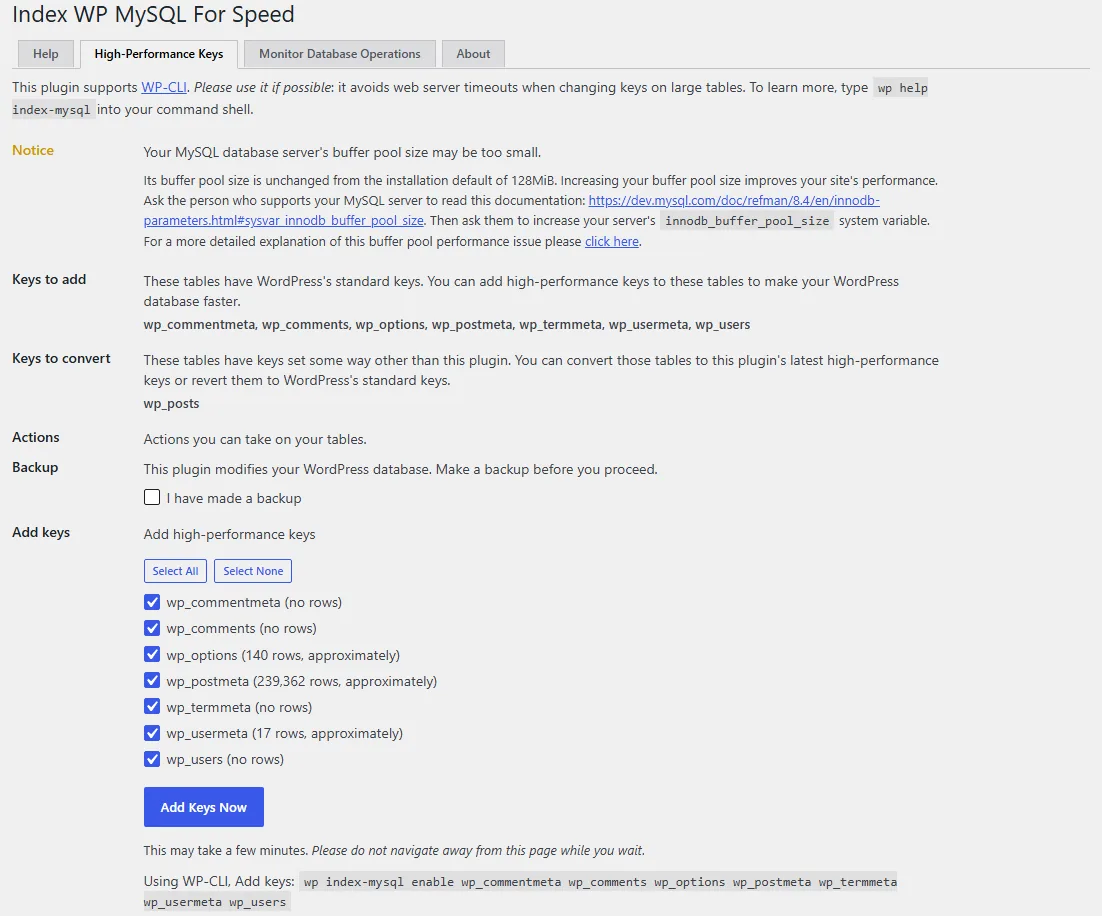
Three details on that screen are worth knowing. It won’t change anything until you tick the backup checkbox. It also flagged our database server’s memory buffer as left at its install default, which is a server setting your host controls, separate from the keys. And it shows each action as a WP-CLI command (wp index-mysql enable ...), which it recommends on large tables because a web request can time out partway through.
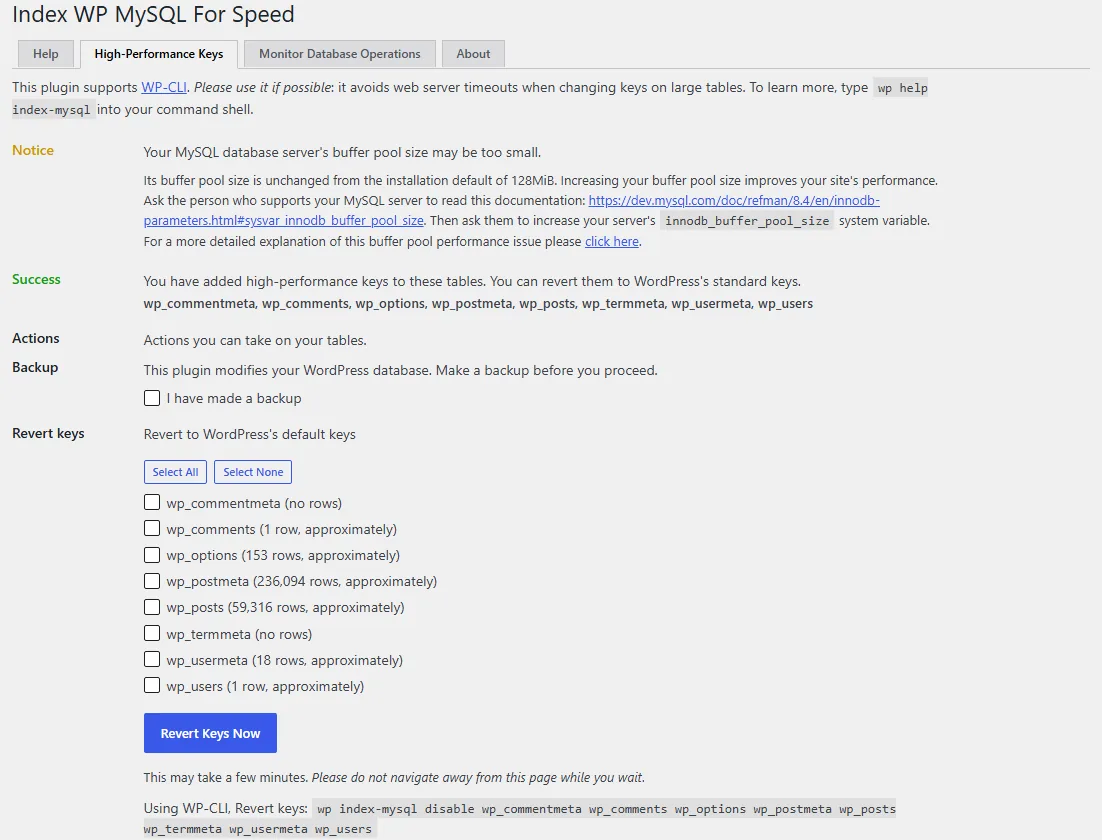
After ticking the box and clicking Add Keys Now (and Convert Keys Now for the posts table), every table showed as done, with one Revert Keys Now button to undo it:
We ran the same two queries five times each before and after, and read MySQL’s own account of the work (EXPLAIN ANALYZE):
| Query | Rows read, default keys | Rows read, plugin keys | Median time, default | Median time, plugin |
|---|---|---|---|---|
| Find one product by its SKU (a meta key plus value) | 60,000 | 1 | 610 ms | 0.1 ms |
| Ten newest out-of-stock posts (a typical meta query) | 60,000 | 8,572 | 1,735 ms | 402 ms |
Trust the rows-read columns more than the timings. The times came from a laptop and swung by a factor of two between runs, but the plan itself changed: WordPress’s default meta_key index covers only the key, so MySQL had to check the value on all 60,000 _sku rows, while the plugin’s key covers the key and the start of the value together, so it went straight to the one row.
Two practical notes from the run. Adding the keys to the 240,000-row metadata table took about 30 seconds, while MySQL rebuilt the table, so on a live site do it in a quiet hour and after a backup. And the revert is real: disabling the keys put back WordPress’s exact three default indexes on that table (PRIMARY, post_id, and meta_key with its 191-character prefix).
On a big metadata table, the right compound key turned a 60,000-row read into a one-row jump.
The trade-off
Indexes are not free. Each one is an extra structure the database stores and updates:
- Disk. Adding keys increases table size, because the index data lives alongside the rows.
- Write cost. Every insert or update has to maintain the indexes too, so a table that’s written constantly pays a small ongoing tax for faster reads.
- Diminishing returns. Indexing columns no query filters on just adds cost with no benefit.
For a read-heavy WordPress site – which most are – the read speed-up on the queries that matter far outweighs the write cost. The skill is indexing the right columns, which is why purpose-built tools that target known-slow WordPress queries are safer than guessing.
When it’s worth doing
Reach for added indexes when a site has grown large – many thousands of posts, heavy metadata, a busy comments or options table – and you can see slow queries in a query monitor or the slow-query log. A small or medium site on default indexes usually needs nothing. And because these keys are reversible – they can be removed to restore the original schema – it’s a low-risk change to trial: add the compound keys, measure the slow queries again, and keep them if the scans became jumps.
The short version
WordPress gets slower as it grows because its default single-column indexes don’t match the multi-column queries a real page runs, so the database falls back to scanning ever-larger tables. Compound indexes – added by hand or by a plugin built for WordPress’s hot queries – cover those query patterns so the database jumps straight to the rows. They cost some disk and a little write overhead, which is a good trade on read-heavy sites, and they’re reversible, so they’re safe to trial on a large, slow database and remove if they don’t help.
Frequently Asked Questions
What is a database index in plain terms?
It’s a lookup structure that lets the database go straight to the rows a query needs instead of reading every row. Like an index at the back of a book, it trades a little extra storage for a much faster way to find things.
Why does my WordPress site slow down only after it gets big?
Because the default indexes are mostly single-column, while real queries filter by several columns at once. On a small site the database scans quickly no matter what; as posts and metadata grow, those unmatched queries scan far more rows, and the lag becomes visible.
Are the extra indexes from a plugin safe to add?
Generally yes, when the plugin targets WordPress’s known-slow queries rather than guessing. The keys are maintained automatically by the database and can be removed to restore the original schema, so they’re low-risk to trial and reverse.
Is there a plugin that adds these indexes for me?
Yes. Index WP MySQL For Speed, free on WordPress.org, adds compound keys tuned to WordPress’s common queries and can revert them to the defaults. In our lab test it cut a metadata lookup from 60,000 rows read to one. Take a backup first, and use its WP-CLI commands on large tables so a slow change can’t time out in the browser.
Do more indexes always make a site faster?
No. Indexes speed up reads but add storage and a small cost to every write, and indexing columns no query filters on just adds overhead. The gain comes from indexing the right columns – the ones your slow queries actually use.
How do I know if I need this?
Look for slow database queries using a query-monitoring tool or the slow-query log on a large site. If specific queries over the post or metadata tables are scanning many rows, matched compound indexes are likely to help; if nothing is slow, you don’t need them.

