WPML gives you a beautifully clean multilingual front end. Then you decide to remove it, and the moment you deactivate the plugin, every language you ever added pours into your English site at once. Nothing was deleted. This is the part nobody shows you before you commit.
Table of Contents
What WPML gets right
It is worth being fair to the tool before taking it apart, because the thing it does well is the thing that makes people adopt it. WPML (WordPress Multilingual) runs every language of your site inside one WordPress install. WPML detects or remembers the reader’s language, and from then on every menu, archive and post list shows that language and nothing else; a switcher flips the whole site over. The URLs are clean, the admin is one dashboard, and you never juggle logins. For a brochure site or a small blog in two or three languages, that is a genuinely pleasant experience for reader and maintainer alike.
WPML’s great trick is making a multi-language site feel like a single tidy site. That trick is also the trap.
How WPML actually stores a translation
The cleanliness is an illusion maintained at query time, and understanding that is the whole story. When you translate a post with WPML, it does not store the other language inside the original post. It creates a brand-new post — its own row in the posts table, its own post ID — for each language. A page that exists in four languages is four separate posts as far as WordPress is concerned.
What ties those four posts together is a separate table WPML adds to your database (its translations table), which records, in effect, “these four post IDs are the same thing in four languages, and this one is the original.” That mapping is WPML’s private bookkeeping. Core WordPress knows nothing about it.
On top of that mapping sits the filter. On every front-end request (and much of the admin), WPML intercepts WordPress’s database queries and narrows them to the current language. Ask WordPress for “the latest ten posts” and WPML silently rewrites that to “the latest ten posts in the current language.” That single, invisible rewrite is what makes the site look like one tidy language at a time.
A WPML site is not one site with many languages inside each post. It is many posts, wearing a filter that only ever shows you one language at a time.
Why deactivating WPML floods your English site
Now the surprise makes sense. The day you decide to remove WPML and deactivate the plugin, two things happen at once: the translations table stops being consulted, and, more importantly, the query filter is gone. WordPress goes back to doing what it does by default: returning every published post, in every language, because without WPML it has no idea that languages exist at all. Your homepage, your category archives, your post lists: all of them now show the English post, the Spanish post, the Hindi post, side by side, as if they were unrelated articles that happened to be on the same site.
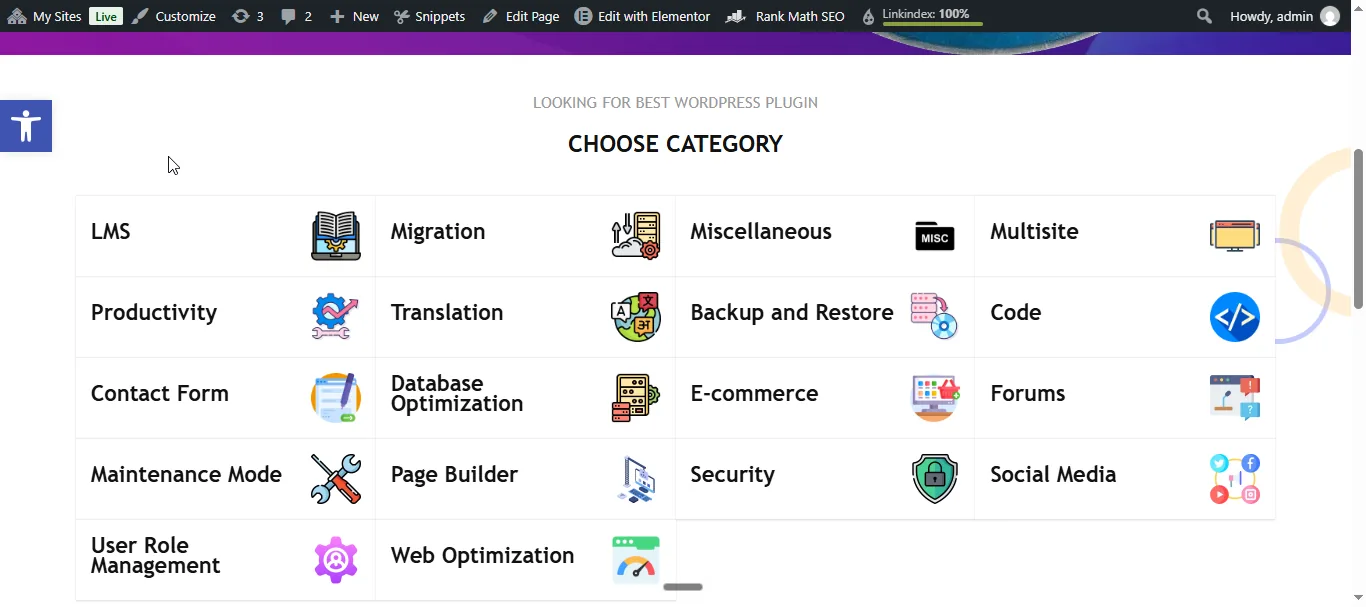
Here is exactly that, on a real site. With WPML active, the front page’s “choose a category” grid is tidy, and every category appears once, in the reader’s language:
Deactivate WPML and the same grid balloons, and each category reappears once per language. Here one category, “Web Optimization”, shows up eight times over; “Security” triples and “Page Builder” doubles:
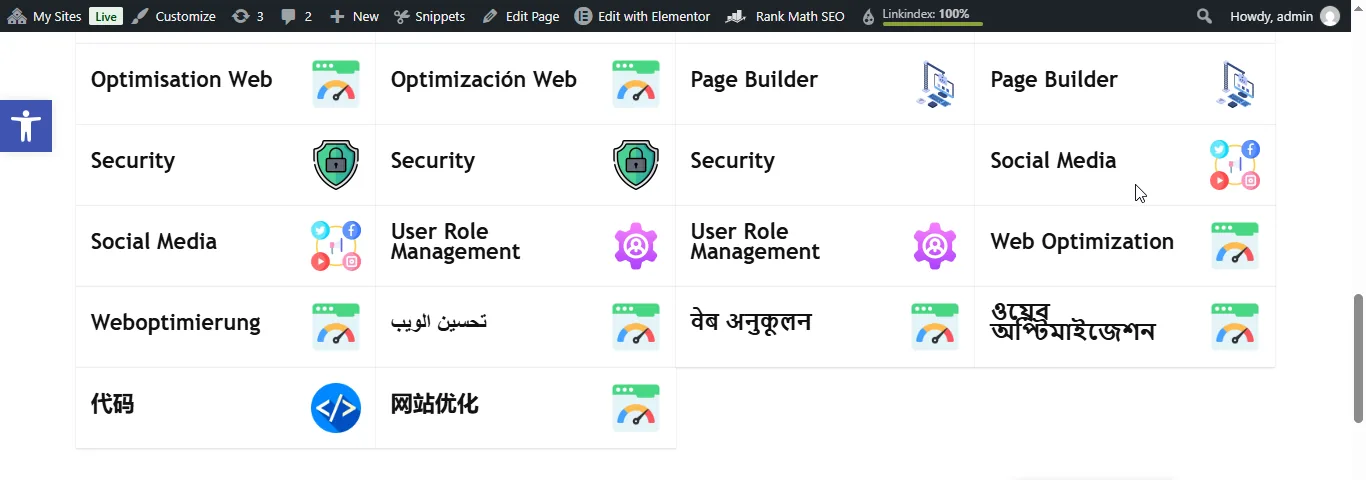
It feels like deactivating the plugin created a mess. It did not. The mess was always there in the database; WPML was the only thing hiding it. Every one of those “extra” posts has existed as its own row since the day you translated it. Reactivate WPML and the filter snaps back on, the site looks tidy again, and it is tempting to conclude you simply must keep WPML forever. That conclusion is the lock-in doing its work.
Why this counts as lock-in
Plenty of plugins leave debris when you remove them: an orphaned options row, an unused table. This is more than debris. The lock-in has three teeth:
- The content is genuinely entangled, not merely decorated. The translations are real, first-class posts. There is no single “turn off and the extra stuff vanishes” switch, because the extra stuff is content, and WordPress will not throw content away just because the plugin that organized it is gone.
- The organizing knowledge lives only in WPML’s own table. Which post is the original and which are its translations is recorded in WPML’s bookkeeping, not in anything core WordPress understands. Remove WPML and you still have all the posts, but you have lost the map of how they relate.
- There is no “export to nothing” button. WPML can export translations for other WPML sites and for translation services, but it has no interest in handing you a clean, WPML-free site; that would be a tool designed to make leaving easy, and few paid plugins are.
None of this is sinister; it is the predictable shape of any tool that organizes your data in its own private structure. But it means “I’ll just remove it later” is not a plan. Later is harder than you think.
The two clean ways out
There is no magic un-WPML command, but there are two honest exits. Pick based on one question: is the site itself worth keeping?
Every language pours into the English site – because each translation was always a SEPARATE post, and WPML was only a query filter hiding them.
One question splits the exit. Don't just pull the plugin – that removes the lens without untangling anything.
While WPML is still ACTIVE (its map is still readable), migrate the languages worth keeping + delete the rest, THEN remove WPML. Single-language site stays.
Removes its posts AND its copy of WPML's tables in one move – no flood to clean. Aim for: one site per language, loosely connected, so each stands on its own.
WPML stores translations as real posts; deactivation removes the filter, not the content. Plan the exit before the lock-in.
Exit A — keep the site, remove WPML. If the site is worth keeping, you leave it in place and just deal with the languages. Any translations worth keeping, migrate into their new home (for a growing site, one subsite per language — see below) while WPML is still active, since that is when its map of which post is which language is still readable; anything not worth keeping, delete. Then remove WPML, and the site, now single-language, stays exactly as it was. Do the languages first and WPML last, or you are sorting an unlabelled pile.
Exit B — delete the whole site. If the site itself was only ever a WPML experiment (stale, superseded, nothing worth keeping), the cleanest exit is to delete the whole subsite. On a multisite that removes its posts and its copy of WPML’s tables in one move, with no flood to clean up, because the entire site goes at once. If a subsite exists mainly to carry a WPML experiment you have outgrown, deleting it is the clean uninstall.
The cleanest way to uninstall WPML from a multisite subsite is not to uninstall it. It is to delete the subsite.
That is the cleanest exit when the whole site is disposable. Ours was not, so we took Exit A and kept the site. Whichever exit you pick, confirm what you do want is captured first.
What Exit A looked like when we ran it
We ran it on 2026-10-10, on a plugin directory published in eighteen languages. The English directory stayed; the other seventeen languages were machine-translated filler with nothing to migrate. With a full backup taken and WPML still active, the order was:
- Translated content, one type at a time, with each admin list filtered to a single language: 56 products, 17 posts and 125 pages.
- Translated terms and menus: 1,673 product categories, 37 product tags, 51 blog categories and 34 menus.
- WPML itself: deactivate, then delete.
- The leftovers WPML would not let go of (below), then a permalinks flush (opening Settings → Permalinks is enough) and a read of the front end.
Two things the plan did not predict.
There were eight WPML plugins, not six. Add-ons are easy to miss in a long plugin list: one for GraphQL was active, and a navigation add-on sat there inactive. List every plugin whose name starts with “WPML” before you plan the order.
One category per language would not delete. Filter Posts → Categories by a language, and every row has a checkbox and a Delete link except one: that language’s copy of the default category.
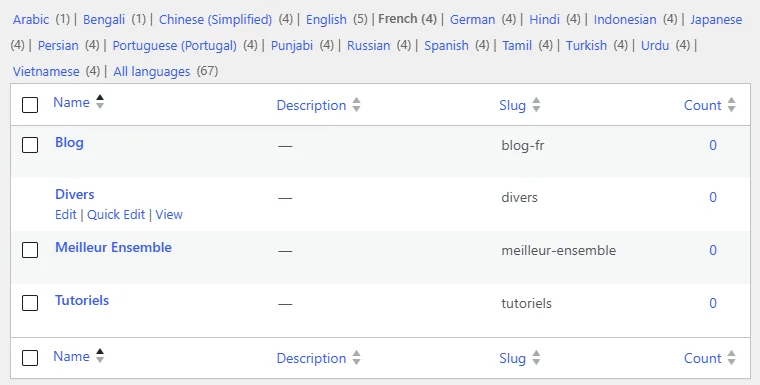
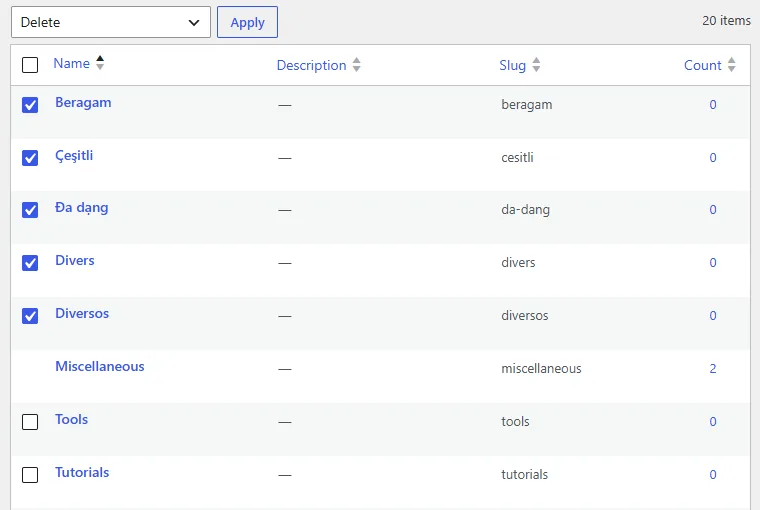
WordPress never deletes the default category: its capability check refuses delete_term for whichever term is the taxonomy’s default. With WPML active, each language’s copy is treated as that language’s default, so all seventeen copies were locked. The way through is the order: leave them for last, deactivate WPML, and they become ordinary categories. Only the real default keeps its lock:
On a multisite, one more check sits between deactivating and deleting: plugin files are shared by every site on the network. Deleting WPML from Network Admin removes it for all of them, so confirm that no other site still has it active. We checked all eight sites; none did.
The result was the point of the exercise: no flood. With the translations gone before the filter, there was nothing left for it to hide, and the English site read the same with WPML off as it had with WPML on: 36 products, 47 posts, 18 pages and one menu. The old language URLs now answer 404, and the sitemap lists no language alternates. WPML’s own tables stay behind in the database, inert, until you drop them.
Where you actually want to end up
If you are going to leave WPML, leave it for something that does not have the same exit problem. The architecture that scales, and that you can walk away from cleanly, is one WordPress site per language, connected loosely rather than entangled. On a multisite network that means a subsite per language, joined by a connector plugin that links the equivalent posts across sites and, with a shared media library, reuses images.
The difference that matters on exit day: each language is a complete, independent WordPress site. Remove the connector and every language site still stands on its own — valid, readable, nothing to untangle, no flood. The thing that links them is a thin layer on top, not a filter baked into every query. You trade a little front-end polish and a single dashboard for content that is never held hostage by the tool that organizes it. For a site you expect to grow, that trade is the right one. The full plan for that move is a separate piece of work; the point here is only that the destination should be chosen before the lock-in, not after.
So should you use WPML at all?
Yes, sometimes. WPML earns its place on a small site in a stable set of languages, run by someone who values the clean single-site front end and is realistic that this is probably the site’s permanent shape. There is nothing wrong with a two-language brochure site on WPML. The problem is not WPML; it is adopting a single-site, deeply-integrated translation model on a site you intend to grow, then discovering the exit cost only once you have hundreds of translated posts. Choose the model for the site you are going to have, not the one you have today.
The short version
- WPML stores each translation as a separate WordPress post, and records which posts are translations of each other in its own hidden database table — core WordPress has no idea languages exist.
- The tidy front end is a query filter. WPML rewrites every query to the current language, so you only ever see one language at a time.
- Deactivating WPML removes the filter, not the content. Your English site then shows every language inline — not because deactivation created copies, but because those posts were always there and WPML was the only thing hiding them.
- That is real lock-in: the content is entangled, the “which is which” map lives only inside WPML, and there is no export-to-a-clean-site button.
- Two clean exits, split by whether the site is worth keeping: keep the site — remove WPML and keep your (single-language) site, migrating or discarding the other languages first while WPML can still read its map; or delete the whole subsite, which takes WPML’s tables with it in one move.
- Delete the default category’s copies last. WordPress never deletes the default category, and with WPML on, every language’s copy counts as one. Deactivate WPML and they delete like any other category.
- Leave for the right destination: one site per language, loosely connected, so removing the connector later leaves every language standing on its own.
- WPML is still a good choice for a genuinely small, stable site. Just choose the model for the site you will grow into, because the exit cost only shows up once you are big.
Frequently Asked Questions
Why do all my translations appear on my English site when I deactivate WPML?
Because WPML keeps the site looking single-language with a query filter, not by hiding the posts anywhere. Each translation is its own ordinary WordPress post; WPML simply rewrites every query to show only the current language. Deactivate the plugin and that filter is gone, so WordPress returns every post in every language — all of which were there all along. Reactivating WPML brings the filter back and the site looks tidy again.
Does deactivating WPML delete my translations?
No, the opposite. Deactivating WPML deletes nothing; it reveals the translated posts that were always in your database by removing the filter that hid them. The risk on the way out is not lost content but an un-mapped pile of posts, and the loss of WPML’s record of which post is the original.
How do I remove WPML without losing content?
Decide first whether the non-English content is worth keeping. If it is, migrate it into its new structure while WPML is still active (so you can still read which post is which language), then remove WPML and delete the leftovers. If it is not worth keeping, delete the translated posts — or, on a multisite, delete the whole subsite, which removes WPML’s tables with it and leaves no flood to clean up. Either way, confirm the content you want is captured somewhere else before you delete anything.
Why can’t I delete a translated category in WPML?
If the row has no checkbox and no Delete link, it is that language’s copy of your default category. WordPress refuses to delete the default category, and with WPML active each language’s copy is treated as that language’s default. Delete everything else first, then deactivate WPML: the copies become ordinary categories you can delete, and only the real default keeps its lock.
Is WPML a bad plugin?
No. WPML does the hard thing (a clean, single-dashboard multilingual front end) genuinely well, and for a small site in a stable set of languages that is exactly what you want. The trouble is architectural, not quality: a single-site, deeply-integrated translation model is hard to scale and hard to leave, so it is the wrong fit for a site you intend to grow, however good the plugin itself is.
What should I use instead of WPML for a site I expect to grow?
One WordPress site per language, connected loosely rather than merged into one install. On a multisite network that is a subsite per language, joined by a connector plugin (and a shared media library so images are not duplicated). The payoff is on exit day: each language is a complete, independent site, so removing the connector leaves every language standing on its own — nothing to untangle and no flood.
Can I just keep WPML deactivated and clean up the posts by hand?
You can, but it is the hardest path: with WPML off you have lost its map of which post is the original and which are translations, so you are sorting by language by eye. If you must go manual, reactivate WPML first, use it to identify each language group, and only then remove it — sort while you still have the labels.

