A Claude API setup needs a spend limit, a key that stays private, and a prompt cache you have confirmed is working. Our first batch skipped that last check and paid about 3.5 times what it should have.
cache_read_input_tokens to confirm it hits. In the Batch API, send one request first, wait for it to finish, then send the rest. Requests that start together cannot read each other’s cache, so in our test 20 of them paid to write the same text 20 times.Table of Contents
Start your Claude API setup with a spend limit
A script with a bug can send requests faster than you can notice, so the limit comes first. Open the Claude Console, go to Spending › Spend limits, click Adjust limit and enter what you are willing to lose this month. Click Add notification too, so you get an email before you reach it.
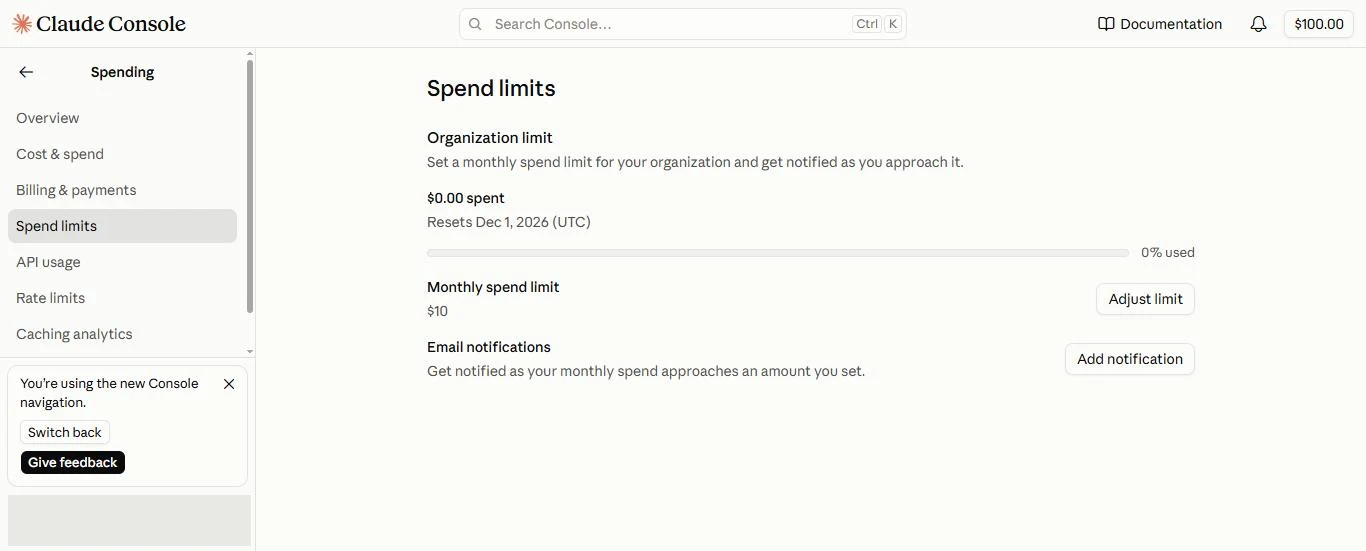
Two more checks on Billing & payments:
- Payment method and auto-reload. If you are working from free credit, you can leave the card off and auto-reload disabled. With no card on file there is nothing to charge past the credit.
- Credit expiry and coverage. Promotional credit has an expiry date, and the page lists what it pays for. On our account it covered the API, the Batch API, the Playground, the Agent SDK and Managed Agents. Claude Code was not on the list, so check yours before you plan around it.
Start low. We began at $10 and raised the limit on purpose before each larger job, which turns every increase into a small decision.
Create the key and test it for free
Go to Keys & access › API keys and click Create key. A panel offers identity federation first; for a script on your own machine, choose Continue with an API key.
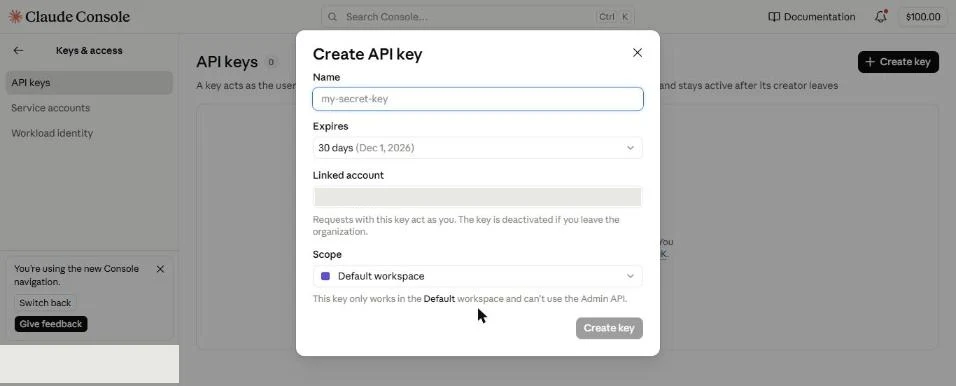
Give the key a name you will recognize, and keep an expiry date, because a forgotten key that expires is one less thing to clean up. Copy it when it appears and assume you will only see it once.
Save it in a .env file in your project, and make sure git ignores that file:
ANTHROPIC_API_KEY=your-key-hereKeep the key out of chats, screenshots and commits. If it leaks, delete it on the same page and create another.
Now test it. Listing the available models uses no credit and never prints the key:
pip install anthropic python-dotenv
python -c "from dotenv import load_dotenv; load_dotenv(); import anthropic; print(len(list(anthropic.Anthropic().models.list())), 'models visible')"Code language: Bash (bash)
A number means the key works. An authentication error at this point has cost you nothing, which is the reason to test here and not on your first real job.
Send one request and read its usage
Every response tells you what it cost in tokens. Get in the habit of printing that before you scale anything:
from dotenv import load_dotenv
import anthropic

load_dotenv()
client = anthropic.Anthropic()

response = client.messages.create(
    model="claude-opus-5-5",
    max_tokens=16000,
    output_config={"effort": "high"},
    messages=[{"role": "user", "content": "Summarize the water cycle in two sentences."}],
)
print(response.content[-1].text)
print(response.usage)
Code language: Python (python)
Set effort yourself instead of relying on the default, since it changes how many tokens the model spends. Lower it for routine work, and compare results on a few real requests before you commit a large job to one level. Current prices are on Anthropic’s pricing page.
Turn on prompt caching for the text you repeat
If many requests share the same long instructions or reference document, prompt caching lets you pay for that text once and reuse it. Mark the end of the shared part:
system = [{
    "type": "text",
    "text": shared_instructions,  # the same bytes on every request
    "cache_control": {"type": "ephemeral", "ttl": "1h"},
}]
Code language: Python (python)
Three rules decide whether it works:
- The cache matches from the start of the request, byte for byte. Put what never changes first. A date, a request ID or a reordered list inside the shared part breaks the match for everything after it, with no error.
- Very short text does not cache. Below the model’s minimum, the marker is ignored silently. The minimum differs by model, so check the table in the documentation.
- Writing costs more than reading. A 5-minute cache costs 1.25 times the normal input price to write, and a 1-hour cache costs 2 times. Reads are far cheaper, at 0.05 times on Claude Opus 5.5 and about 0.1 times on most other models.
A cache you never read is a surcharge, so a cached request that never hits costs more than having no cache at all.
Use 5 minutes when requests follow each other quickly. Use 1 hour when the gaps are longer, which includes most batch work, and expect it to pay off from about the third request.
Check that the cache is actually hitting
Send the same cached request twice, one after the other, and compare the two usage reports. This script does it with a short reply, so the test costs little beyond the one cache write:
from dotenv import load_dotenv
import anthropic

load_dotenv()
client = anthropic.Anthropic()

shared_instructions = open("instructions.md", encoding="utf-8").read()  # your long, unchanging text

system = [{
    "type": "text",
    "text": shared_instructions,
    "cache_control": {"type": "ephemeral", "ttl": "1h"},
}]

for attempt in (1, 2):
    response = client.messages.create(
        model="claude-opus-5-5",
        max_tokens=1000,
        output_config={"effort": "low"},
        system=system,
        messages=[{"role": "user", "content": "Reply with one word: ready."}],
    )
    usage = response.usage
    print(attempt, "written:", usage.cache_creation_input_tokens, "read:", usage.cache_read_input_tokens)
Code language: Python (python)
The second request starts only after the first has finished, which is what lets it read the cache. You should see:
| Field | First request | Second request |
|---|---|---|
cache_creation_input_tokens | The size of the shared text | 0 |
cache_read_input_tokens | 0 | The size of the shared text |
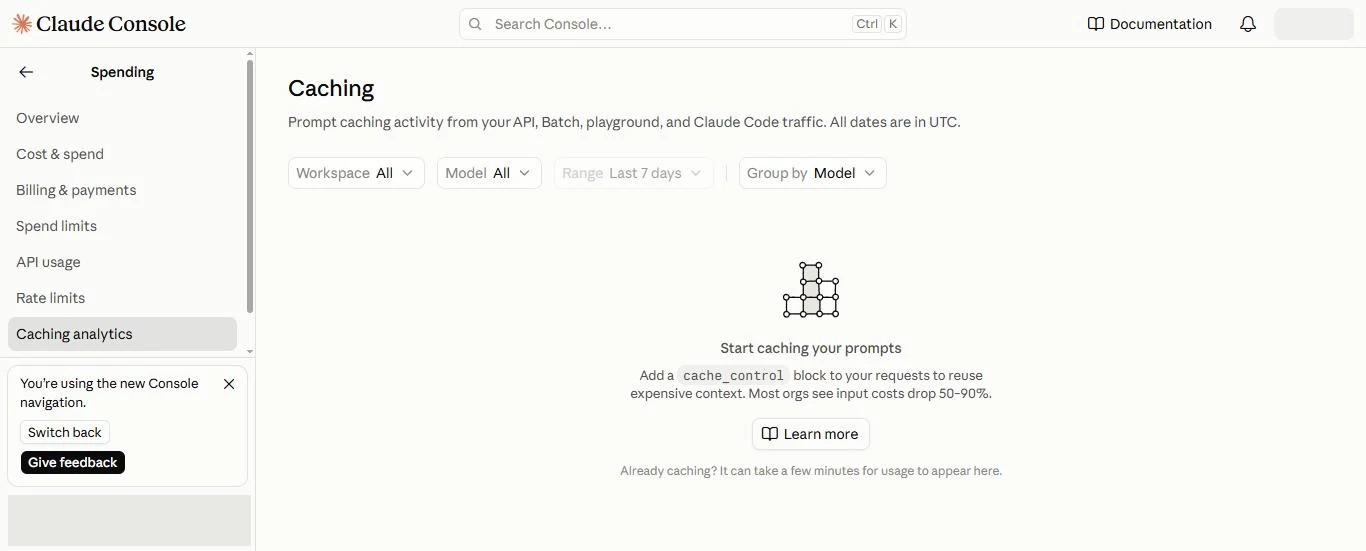
If the read stays at 0, something in the shared text is changing between requests. Print it from both requests and compare them. If the write is also 0, the text is probably below the minimum or the marker is missing. The Console’s Spending › Caching analytics page shows the same picture over time, and it can take a few minutes for new usage to appear there.
Why a batch can pay for the same cache many times
The Batch API halves the price of every token in exchange for waiting. Most batches finish within an hour, and the limit is 24 hours. It looks like an obvious partner for caching, and this is where we lost money.
Our first test was 20 long writing requests sharing about 51,000 tokens of instructions and reference text. We marked that text with a 1-hour cache and submitted all 20 together. A cache entry only becomes readable once the request writing it has started responding. Requests running side by side all miss, and each one writes its own copy. The usage report showed it plainly: more than a million tokens written, and none read.
Here is what that cost, next to the fix:
| Run | Requests | Cache written | Cache read | Total | Per request |
|---|---|---|---|---|---|
| All submitted together (measured) | 20 | 1,022,580 | 0 | $5.31 | $0.265 |
| One first, then the rest (measured) | 5 | 51,678 | 206,712 | $0.52 | $0.105 |
| Same 20 with no cache at all (calculated) | 20 | 0 | 0 | about $3.27 | $0.163 |
| Same 20, one first, then 19 (calculated) | 20 | about 51,000 | about 971,000 | about $1.52 | $0.076 |
All rows use Claude Opus 5.5 at batch prices as of November 2026. The two calculated rows take the measured tokens from the first run and apply the same rates, which reproduce both measured totals to the cent. Per-request cost keeps falling as the batch grows, because only one request pays for the write.
Twenty requests paid to write the same text twenty times, and the cache made the job dearer than having none.
Submit one request first, then the rest
The fix takes two submissions. The first batch holds one request, which writes the cache. When it has ended, the second batch holds everything else, and every request in it can read.
import time

def params(question):
    return {
        "model": "claude-opus-5-5",
        "max_tokens": 16000,
        "output_config": {"effort": "high"},
        "system": system,  # identical in every request
        "messages": [{"role": "user", "content": question}],
    }

def run(pairs):
    batch = client.messages.batches.create(
        requests=[{"custom_id": cid, "params": params(q)} for cid, q in pairs])
    while client.messages.batches.retrieve(batch.id).processing_status != "ended":
        time.sleep(60)
    return batch.id

started = time.time()
run(jobs[:1])               # writes the cache
if time.time() - started > 50 * 60:
    raise SystemExit("The first batch took too long; the cache may be gone. Start again.")
rest_id = run(jobs[1:])     # reads it

for entry in client.messages.batches.results(rest_id):
    if entry.result.type == "succeeded":
        print(entry.custom_id, entry.result.message.usage.cache_read_input_tokens)
Code language: Python (python)
Results come back in any order, so match them by custom_id. Three things to watch:
- Submit the second batch promptly. The code stops if more than 50 minutes have passed since the first one started, which leaves a margin inside the 1-hour cache.
- A slow batch can still miss. Because a batch may take far longer than an hour, a late request can find the cache gone and write it again. Read the totals afterwards instead of assuming.
- Build the shared text once. Create
systema single time and reuse the object, so that no timestamp or changed ordering creeps in between the two submissions.
In our staged test, all four requests in the second batch hit the cache.
Rehearse small, because cancelling comes too late
Before any large job, run a handful of requests and read the report: tokens by type, total cost and the cache read count. We tried to cancel our first batch while it was running. By the time the cancel went through, all 20 requests had finished and been billed, so a cancel button is no substitute for a rehearsal.
Multiply the rehearsal’s per-request cost by the size of the real job, and raise the spend limit to that figure only if the result is worth it. The five-request test that proved the fix cost 52 cents. The mistake it would have caught cost $5.31, and it would have grown with every request.
What the fix did on real runs
After the rehearsal, we used the two-step submission for real work: course descriptions for a directory site, with every request sharing about 53,000 tokens of instructions and reference text.
| Run | Requests | Cache written | Cache read | Hit rate | Total | Per request |
|---|---|---|---|---|---|---|
| All submitted together (the first test) | 20 | 1,022,580 | 0 | 0% | $5.31 | $0.265 |
| One first, then 19 | 20 | 52,682 | 1,000,958 | 95% | $1.65 | $0.082 |
| One first, then 39 | 40 | 53,169 | 2,073,591 | 98% | $2.91 | $0.073 |
| One first, then 82 | 83 | 51,407 | 4,215,374 | 99% | $5.65 | $0.068 |
The hit rate is the share of cached tokens that were read rather than written. All three production runs were measured, not calculated. The run of 20 cost slightly more than the $1.52 we had estimated, because its answers were longer: about 12,000 more output tokens than the first test.
The same 20 requests cost $5.31 submitted together and $1.65 submitted in two steps.
Does a bigger or longer batch cost less?
Only a little. Here is where the money went in the run of 40:
| Part of the cost | Amount | Share | Paid per request? |
|---|---|---|---|
| Output: the written text plus the model’s thinking | $2.32 | 80% | Yes, about $0.058 each |
| Cache reads | $0.21 | 7% | Yes, about $0.005 each |
| Input outside the cache | $0.17 | 6% | Yes, about $0.004 each |
| Cache write | $0.21 | 7% | No, once per run |
Only the cache write is shared, so only it shrinks as a run grows: about $0.011 a request in a run of 20, $0.005 in a run of 40 and $0.002 in a run of 100. Going from 40 to 100 requests saves about $0.003 a request. The cost levels off near $0.067 a request, however large the run. Our run of 83 came to $0.068 a request, in line with that.
Running back to back changes little too. A cache read resets the cache’s hour, so a run started inside it can skip the single-request step, saving about $0.21, but only if the shared text is unchanged. Any edit to the instructions between runs means a fresh write.
To cut the bill, shrink the output instead. Output is most of the cost and it is paid on every request, so the levers are effort, max_tokens and the length of what you ask for.
Is a batch cheaper than an interactive agent?
If your agent bills to the same API key, usually yes. If a subscription covers the agent, it costs no extra money, only time and usage allowance, and the batch’s advantage is speed.
Here is our estimate for one course description. Only the batch drafting is measured; the other figures come from token counts, not from a bill.
| Batch, then review | Interactive agent | |
|---|---|---|
| Drafting | $0.073 (measured) | about $0.12: the same output at full price, not half |
| Review against the source | about $0.05 | almost nothing: the source is already in its context |
| Coordination and context | about $0.05 | about $0.15 to $0.25: every step re-reads the conversation |
| Total per item | about $0.15 to $0.20 | about $0.30 to $0.40 |
| Time for 40 items | about 10 minutes of drafting, plus a review run in parallel | several hours, one item at a time |
The agent’s hidden cost is its context. Each step, whether reading a file, writing or running a check, sends the whole conversation again, by then 100,000 to 200,000 tokens, at the cache price. With three or four steps per item, that outweighs the drafting. It also grows as the session gets longer, so start a fresh session every few batches. Batch requests each see only their own prompt, so their cost stays flat.
The cheaper drafts were not finished pages. Rereading all 85 against their sources found no wrong facts, but about one in three described its source (“the overview mentions”) instead of the course, and because each request is written alone, ideas repeated across the batch. The review is part of the price, not an option. Local catalog generation compares the two routes on judgment and quality.
Your setup checklist
Before the first request
- A monthly spend limit and an email notification are set.
- Auto-reload is off, unless you mean to pay past your credit.
- You know when any free credit expires and what it covers.
- The key sits in an ignored
.envfile, and listing models works.
Before any repeated job
- The shared text comes first, is identical every time, and has a cache marker.
- A second identical request shows
cache_read_input_tokensabove 0. effortand the model are set on purpose.
Before any batch
- One request goes first, and the rest follow after it ends.
- A small rehearsal has produced a real per-request cost.
- The limit covers that cost multiplied by the job size, with room to spare.
- A review of every output is planned, including one pass over the whole batch for repeats.
The short version
Set the spend limit before the key exists, and test the key with a free model listing. Cache the long text your requests share, and confirm it by reading cache_read_input_tokens. In a batch, send one request first and the rest after it ends, since parallel requests cannot share a cache: in our runs that was the difference between $0.265 and $0.068 per request. A bigger run saves little more, because output is most of the cost. Rehearse on a few requests before you raise the limit, and review every output before you use it.
Frequently Asked Questions
What if my requests share no text?
Caching has nothing to reuse, so leave it off and avoid the write premium. The Batch API’s half price still applies to every token, provided you can wait for the results. Results stay available for 29 days after a batch is created.
Does a Claude subscription include API usage?
Treat them as separate. Your key draws on the Console’s own balance, shown at the top right of the Console and under Billing & payments, so check there before you count on any credit.
Can one request in a batch fail without losing the rest?
Yes. Each request reports its own result as succeeded, errored, canceled or expired, so read the type for each one before using its text, and resubmit only the ones that didn’t succeed.
What else is a batch good for besides writing?
Any job made of many similar, self-contained items, where code can check the output and a person keeps the final call. For our own catalog we ranked these: a cheap critic pass that flags likely problems in each draft before the human review, at about $0.01 to $0.02 an item; a one-off audit of every item’s category; first-pass verdicts on suspected duplicates, with the evidence; flags on outdated items; and translation of pages already reviewed. In each case the batch proposes and a person decides. Keep it away from anything that writes straight to a live site or database.
Can the API credit pay for writing code?
It can, in three ways. An agent such as Claude Code, or one built with the Agent SDK, can bill to an API key, and it suits real code work because coding needs a loop of reading files, editing and running tests that a single request cannot do. On our account the promotional credit listed the Agent SDK but not Claude Code, so check what yours covers. The same agent can also run unattended on a well-defined task, ending in a branch for review. The Batch API suits repetitive code drafts, such as first-draft tests for many functions, docstrings, or a pass that flags likely bugs. It costs half as much, but it cannot run anything, so apply and test every output afterwards.

