Sell or list online courses through WooCommerce and every course page tells search engines it is a product. Run one through a schema validator and you’ll see a Product and no Course. Three short snippets fix the course pages, the course lists and the provider pages, with the free or Pro version of Rank Math.
Course type from schema.org, the structured data that says a page describes a course, who provides it and what it costs. WooCommerce stores every course as a product, so an SEO plugin labels it Product. Rank Math lets code edit its structured data through the rank_math/json_ld filter, which exists in the free plugin. Use it to replace Product with Course on each course page, turn category pages into a list of courses, and mark provider pages as profiles. Rank Math Pro can build the course-page Course from a form, but it still takes a few lines of code to drop the Product, and the lists still need the snippet. Validate with the Schema Markup Validator.Table of Contents
Why course pages read as products
WooCommerce has one content type for anything you list: the product. An SEO plugin sees a product page and describes it as a Product, with offers, price and reviews. That suits a lamp. For a course it is the wrong label: answer engines and search tools read “product with a price” where you meant “a course from this provider, online, free”.
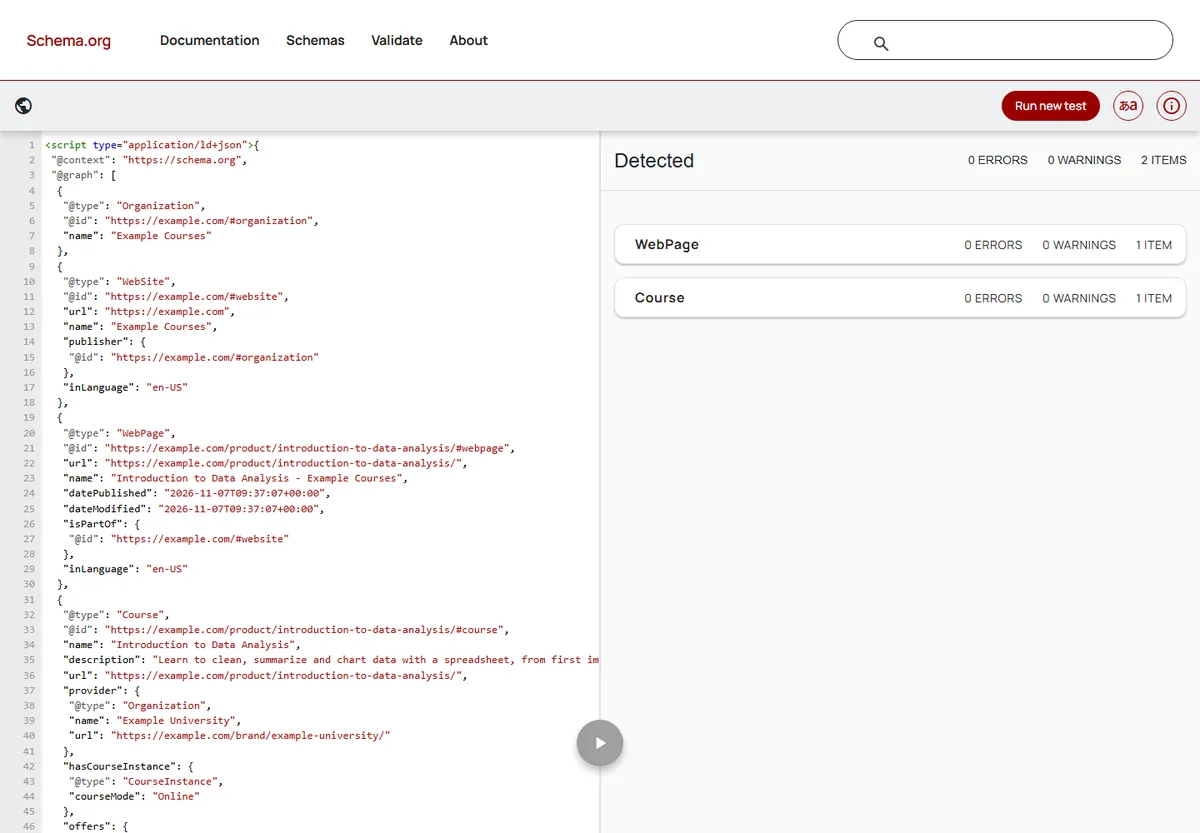
What Course schema still earns you is worth stating plainly. In June 2025 Google retired the Course Info rich result, the detailed course box for a single course page. The course list carousel is still documented: a page that lists three or more courses, each marked as a Course, can appear as a carousel (Google’s course list guidelines). Beyond Google, correct types help every system that reads structured data, including the AI answer engines that summarize pages.
A course listed through WooCommerce is still a course. The schema should say so.
Before you start
- Rank Math is active, free or Pro, with the Schema and WooCommerce modules switched on (Rank Math SEO, then Dashboard, then Modules). The filter below runs only when the Schema module is on.
- A place for code: a code-snippets plugin, a small site plugin, or your child theme’s
functions.php. Test on a staging copy first. - Course lists on category pages: Rank Math SEO, then Titles & Meta, then Product Categories: switch Remove Snippet Data off. It is on by default, and while it is on, category pages carry no list of courses at all, so step 2 has nothing to convert. Brand pages are not affected.
- Providers as brands (optional): the code reads the course provider from WooCommerce’s Brands taxonomy (
product_brand, built into WooCommerce since version 9.6). Without brands, it falls back to your site name.
Step 1: Replace Product with Course on each course page
This snippet runs on single product pages, removes Rank Math’s Product node and adds a Course built from the product’s own fields. The helper at the top finds the provider and is shared by the later steps.
function mysite_course_provider( $product_id ) {
    $brands = get_the_terms( $product_id, 'product_brand' );
    if ( $brands && ! is_wp_error( $brands ) ) {
        $provider = array( '@type' => 'Organization', 'name' => $brands[0]->name );
        $link     = get_term_link( $brands[0] );
        if ( ! is_wp_error( $link ) ) {
            $provider['url'] = $link;
        }
        return $provider;
    }
    return array( '@type' => 'Organization', 'name' => get_bloginfo( 'name' ), 'url' => home_url( '/' ) );
}

add_filter( 'rank_math/json_ld', 'mysite_course_schema', 99, 2 );

function mysite_course_schema( $data, $jsonld ) {
    if ( ! function_exists( 'is_product' ) || ! is_product() ) {
        return $data;
    }
    $product = wc_get_product( get_queried_object_id() );
    if ( ! $product ) {
        return $data;
    }
    $id   = $product->get_id();
    $url  = get_permalink( $id );
    $text = $product->get_short_description() ? $product->get_short_description() : $product->get_description();
    $desc = trim( wp_strip_all_tags( $text ) );

    $course = array(
        '@type'             => 'Course',
        '@id'               => $url . '#course',
        'name'              => $product->get_name(),
        'description'       => $desc ? $desc : 'Online course: ' . $product->get_name(),
        'url'               => $url,
        'provider'          => mysite_course_provider( $id ),
        'hasCourseInstance' => array( '@type' => 'CourseInstance', 'courseMode' => 'Online' ),
    );
    $image = wp_get_attachment_image_url( $product->get_image_id(), 'full' );
    if ( $image ) {
        $course['image'] = $image;
    }
    $price = $product->get_price();
    if ( '' !== $price ) {
        $course['offers'] = array(
            '@type'         => 'Offer',
            'price'         => (string) $price,
            'priceCurrency' => get_woocommerce_currency(),
            'category'      => (float) $price > 0 ? 'Paid' : 'Free',
            'url'           => $url,
        );
    }

    // Remove the Product node, whatever key Rank Math filed it under.
    foreach ( $data as $key => $node ) {
        if ( is_array( $node ) && isset( $node['@type'] ) && 'Product' === $node['@type'] ) {
            unset( $data[ $key ] );
        }
    }
    $data['Course'] = $course;
    return $data;
}
Code language: PHP (php)
Two details matter. The Product node is found by its type, not by a fixed key, because Rank Math doesn’t always file it under the same key. And the filter runs at priority 99, after Rank Math has built its own graph, so there is something to replace.
Step 2: Turn category pages into a course list
A product category page lists products, and Rank Math describes them as products. This is where the free and Pro versions differ: Pro wraps the products in one ItemList, while the free plugin adds each product separately inside an untyped group. Code written against one shape silently does nothing on the other. The helper below gathers the products from either shape into one ItemList, and the filter then turns each entry into a Course.
function mysite_products_to_itemlist( $data ) {
    $products = array();
    foreach ( $data as $key => $node ) {
        if ( ! is_array( $node ) ) {
            continue;
        }
        if ( isset( $node['@type'] ) && 'Product' === $node['@type'] && ! empty( $node['url'] ) ) {
            $products[] = $node;
            unset( $data[ $key ] );
            continue;
        }
        // Rank Math free: an untyped group whose own @graph holds the products.
        if ( ! isset( $node['@type'] ) && isset( $node['@graph'] ) && is_array( $node['@graph'] ) ) {
            foreach ( $node['@graph'] as $i => $item ) {
                if ( is_array( $item ) && isset( $item['@type'] ) && 'Product' === $item['@type'] && ! empty( $item['url'] ) ) {
                    $products[] = $item;
                    unset( $data[ $key ]['@graph'][ $i ] );
                }
            }
            if ( empty( $data[ $key ]['@graph'] ) ) {
                unset( $data[ $key ] );
            } else {
                $data[ $key ]['@graph'] = array_values( $data[ $key ]['@graph'] );
            }
        }
    }
    if ( ! $products ) {
        return $data; // Rank Math Pro: the ItemList is already there.
    }
    $data['ItemList'] = array( '@type' => 'ItemList', 'itemListElement' => array() );
    foreach ( $products as $n => $product ) {
        $data['ItemList']['itemListElement'][] = array( '@type' => 'ListItem', 'position' => $n + 1, 'item' => $product );
    }
    return $data;
}

add_filter( 'rank_math/json_ld', 'mysite_course_list_schema', 99, 2 );

function mysite_course_list_schema( $data, $jsonld ) {
    if ( ! is_tax( array( 'product_cat', 'product_brand' ) ) ) {
        return $data;
    }
    $data = mysite_products_to_itemlist( $data );
    foreach ( $data as $key => $node ) {
        if ( ! is_array( $node ) || ! isset( $node['@type'] ) || 'ItemList' !== $node['@type'] ) {
            continue;
        }
        foreach ( $node['itemListElement'] as $i => $entry ) {
            $item = isset( $entry['item'] ) ? $entry['item'] : null;
            if ( ! is_array( $item ) || ! isset( $item['@type'] ) || 'Product' !== $item['@type'] ) {
                continue;
            }
            $id   = url_to_postid( $item['url'] );
            // Rank Math's list name carries the SEO title ("Course - Site name"); use the product's own title.
            $name = $id ? get_the_title( $id ) : ( isset( $item['name'] ) ? $item['name'] : '' );
            $data[ $key ]['itemListElement'][ $i ]['item'] = array(
                '@type'       => 'Course',
                'name'        => $name,
                'description' => ! empty( $item['description'] ) ? $item['description'] : 'Online course: ' . $name,
                'url'         => $item['url'],
                'provider'    => mysite_course_provider( $id ),
            );
        }
    }
    return $data;
}
Code language: PHP (php)
The list check looks for "@type": "ItemList" specifically. A breadcrumb trail also has list entries, and a looser check would turn your breadcrumbs into courses. The filter covers category pages and brand pages; Google needs at least three courses on a page before it considers the course list carousel.
Code written against one plugin version’s output can fail silently on the other.
Step 3: Mark provider pages as profiles
A brand page (one provider’s courses) is about that provider. This snippet marks Rank Math’s CollectionPage as a ProfilePage too, and adds the provider as its main entity. The course list on the same page comes from step 2.
add_filter( 'rank_math/json_ld', 'mysite_provider_profile_schema', 99, 2 );

function mysite_provider_profile_schema( $data, $jsonld ) {
    if ( ! is_tax( 'product_brand' ) ) {
        return $data;
    }
    $term = get_queried_object();
    $url  = get_term_link( $term );
    if ( is_wp_error( $url ) ) {
        return $data;
    }
    $org  = array( '@type' => 'Organization', '@id' => $url . '#organization', 'name' => $term->name, 'url' => $url );
    $desc = trim( wp_strip_all_tags( term_description( $term ) ) );
    if ( $desc ) {
        $org['description'] = $desc;
    }
    $data['ProviderOrganization'] = $org;

    foreach ( $data as $key => $node ) {
        if ( is_array( $node ) && isset( $node['@type'] ) && 'CollectionPage' === $node['@type'] ) {
            $data[ $key ]['@type']      = array( 'CollectionPage', 'ProfilePage' );
            $data[ $key ]['mainEntity'] = array( '@id' => $url . '#organization' );
            return $data;
        }
    }
    $data['ProfilePage'] = array(
        '@type'      => 'ProfilePage',
        '@id'        => $url . '#profile',
        'url'        => $url,
        'name'       => $term->name,
        'mainEntity' => array( '@id' => $url . '#organization' ),
    );
    return $data;
}
Code language: PHP (php)
The same pattern works for an instructor taxonomy, if your store has one: change the taxonomy name and use Person instead of Organization.
Step 4: Check the result
- Open a course page and paste its URL into the Schema Markup Validator. Look for one
Coursewith a provider and noProduct. - Do the same for a category page: expect an
ItemListwhose entries are allCourse, and no strayProduct. - Run a category page with three or more courses through Google’s Rich Results Test to see whether it qualifies for the course list.
- If you use a page cache, clear it first, or you will be testing the old markup.
On a test store with four sample courses, the course page showed one Course (with provider, offer and course mode) and no Product, and the category page showed a CollectionPage, a BreadcrumbList and an ItemList of four courses. The validator reported 0 errors and 0 warnings on both. Google’s Rich Results Test found 6 valid items on the category page, a breadcrumb, a carousel and four course list items, so that page is eligible for the course list.
With Rank Math Pro, a form and a short snippet
Pro’s schema templates build the course-page Course without code, but they don’t take the Product away. (Whether the rest of Pro earns its price is a separate question; eleven yes-or-no questions settle it.) Here is the route that worked on a test store:
- Go to Rank Math SEO, then Schema Templates, then Add New. Choose Course and click Use.
- Fill the fields from Rank Math’s variables. Change the headline from
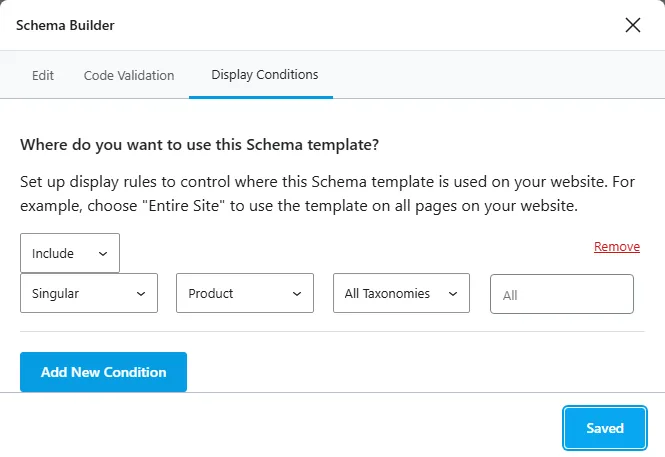
%seo_title%to%title%: the SEO title carries your site name, and it showed up in the course name. Check the offer fields too, since the defaults left the price out. - Open Display Conditions and choose Include, Singular, Product. The taxonomy box can narrow it to one product category, which suits a store that also sells physical products. Click Save; the template is live at once.
With only the template, the course page carried the new Course and Rank Math’s Product side by side. Setting the default schema type for products to None (Rank Math SEO, then Titles & Meta, then Products) did remove Rank Math’s Product, but WooCommerce then printed its own Product block instead. What worked is this short snippet, which removes the Product and leaves the template’s Course:
add_filter( 'rank_math/json_ld', 'mysite_remove_product_schema', 99, 2 );

function mysite_remove_product_schema( $data, $jsonld ) {
    if ( function_exists( 'is_product' ) && is_product() ) {
        foreach ( $data as $key => $node ) {
            if ( is_array( $node ) && isset( $node['@type'] ) && 'Product' === $node['@type'] ) {
                unset( $data[ $key ] );
            }
        }
    }
    return $data;
}
Code language: PHP (php)
Use the template or the step 1 snippet, not both: with both, the page carried two Course entries. The course lists and provider pages are the same with Pro, because Pro still lists a category’s entries as products, so steps 2 and 3 apply unchanged. The step 2 helper already handles Pro’s shape.
The short version
WooCommerce lists courses as products, so Rank Math describes them as Product. The free plugin’s rank_math/json_ld filter lets three short snippets fix that: replace Product with Course on course pages, turn category and brand pages into lists of courses that work with both the free and Pro output, and mark provider pages as profiles. Switch off Rank Math’s “Remove Snippet Data” for product categories first. With Rank Math Pro, a Course template plus a short snippet replaces step 1; the lists still need code. Check every page type in the Schema Markup Validator.
Frequently Asked Questions
My store also sells physical products. Will this remove their Product schema?
Yes, as written, every product page becomes a course. Limit it to your courses by adding a category check after the $product line in step 1, for example if ( ! has_term( 'courses', 'product_cat', $product->get_id() ) ) { return $data; }, with your own category slug. In step 2, name your course categories in the page check, for example is_tax( 'product_cat', array( 'courses' ) ), so the lists of physical products stay as they are.
Can I add Course schema without Rank Math?
Yes. Without an SEO plugin there is no graph to edit, so print your own JSON-LD block from a wp_head action instead, as our FAQ schema guide does for questions and answers. Build the same Course array and output it with wp_json_encode().

