The theme demo looks incredible. Then you install it, import the dummy content, and your “blazing-fast” site loads like treacle. Choosing a theme well is mostly about ignoring the demo and reading the code.
A theme’s demo sells you the pictures; what you live with afterwards is its code.
Table of Contents
Classic themes vs block themes (Full Site Editing)
If you haven’t built a WordPress site recently, the landscape has changed. There are now two distinct paths:
Classic themes (the traditional route). These themes — GeneratePress or Kadence, for instance — use PHP templates and the WordPress Customizer. They are proven, fast, and a good fit if you prefer structured, form-based customisation.
Block themes (Full Site Editing). Introduced in WordPress 5.9, block themes let you edit every part of your site — header and footer included — using the native Gutenberg block editor. Twenty Twenty-Four is one of these.
Traditional, structured approach. Uses PHP templates and the WP Customizer. Proven, fast — a good fit if you prefer form-based setups.
The modern, visual approach. Edit everything (headers, footers) using the native Gutenberg editor. Requires more design intuition.
Performance is independent of architecture. A well-coded theme is fast regardless of whether it uses PHP or Blocks.
Neither is better in the abstract. Pick classic if you want a stable, form-based setup; pick a block theme if you want to lay out the whole site visually and are comfortable on the newer editor.
Choose a lightweight framework, not a kitchen-sink theme
When it comes to WordPress themes, less is more. A theme overloaded with features — bundled sliders, animations, custom post types — looks attractive in a demo, but it comes at the cost of slower load times and a heavier DOM.
Instead of an all-in-one “kitchen-sink” theme, choose a lightweight framework. The fastest options available today include:
These load quickly out of the box and give you the foundational hooks you need without locking you into proprietary code. (How much the theme matters to overall speed, and where it sits among the other levers, is its own topic — see the WordPress speed-optimisation guide.)
The features that make a demo dazzle are the same ones that make the live site crawl.
Test a theme’s real speed — on a blank install
Before you commit, test the theme’s code quality. The catch: running a theme demo through a performance tool is misleading, because you are measuring the demo’s images and content, not the theme.
How to test a theme honestly:
- Install the free version on a blank local WordPress site.
- Do not import the dummy content.
- Run the blank installation through Google PageSpeed Insights or GTmetrix.
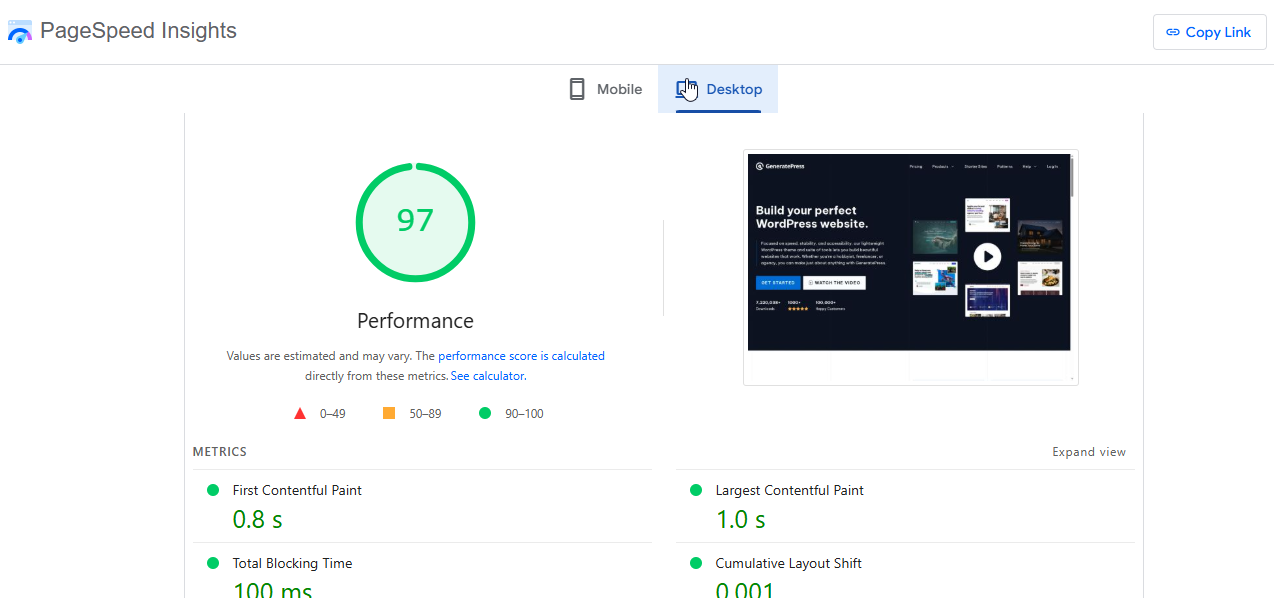
Look specifically at the DOM size and the number of HTTP requests. A clean theme should keep the DOM under roughly 150 elements on a blank page; the free performance tools worth keeping are rounded up in the web-performance and media tools list.
Make sure it’s genuinely responsive
Most of the world’s web traffic now comes from phones, so a mobile-friendly design isn’t optional — and Google indexes the mobile version of your site first, so a theme that breaks on small screens hurts your rankings as well as your readers.
A theme that breaks on a phone is broken for most of the people who visit you.
Before you choose, open the theme’s demo in your browser’s developer tools (F12) and check it at a few mobile viewport sizes. If the demo is already cramped or overflowing, the live site will be too.
Prefer the freemium model to a fully free theme
Free themes are budget-friendly, but relying on a completely free theme from an unknown developer carries real risks: infrequent updates, no professional support, and the chance of abandonment.
Look instead for the freemium model. Themes like Astra and Kadence offer genuinely capable free versions in the WordPress repository, backed by paid upgrades. That tells you the theme is maintained by a business with a reason to keep maintaining it — which lowers your long-term risk.
The short version
- Ignore the demo; read the code. The bundled sliders and animations that make a demo look good are the same features that slow the live site down. A theme should be a fast, clean canvas.
- Pick a lightweight framework — GeneratePress, Astra, Kadence, Neve — over a feature-stuffed theme.
- Classic vs block is about how you edit: classic themes use PHP + the Customizer; block themes use Full Site Editing in the Gutenberg editor. Neither is better in the abstract.
- Test on a blank install, not the demo — no dummy content, then PageSpeed/GTmetrix; watch the DOM size and request count.
- Responsive is non-negotiable — most traffic is mobile, and Google indexes mobile-first.
- Prefer freemium to fully free — a paid tier means someone is paid to keep the theme maintained.
Frequently Asked Questions
What is the difference between a theme and a page builder?
A theme controls the overarching layout, header, footer and global typography of your site. A page builder (like Elementor or the Block Editor) is a plugin used to design the layout of individual pages or posts within that theme’s canvas.
Should I use a premium theme or a free theme?
For a production site, a premium theme — or the pro version of a freemium theme — is the safer choice. The cost (typically $50–$100 a year, as of 2026) pays for itself in dedicated support, frequent security updates, and advanced customisation without needing to write code.
Does changing my WordPress theme affect SEO?
Yes. Changing your theme alters your site’s HTML structure, load speed and schema markup. Your content stays intact, but a poorly coded new theme can hurt your Core Web Vitals and cause a temporary — or lasting — drop in rankings. Test the replacement on a staging copy before switching.

