Put a glowing core in the middle of a darker ring and something unsettling happens — the image looks like an eye. It’s not a rendering bug; it’s your own visual system, and the fix is compositional.
Pareidolia is the brain’s tendency to see faces and eyes in ambiguous shapes — the reason two dots and a curve read as a smiley. In illustration it’s a specific, repeatable trap: the most natural way to draw a “core,” “nucleus,” “singularity,” or “energy source” — a bright blob in the middle — lands squarely on the eye pattern.
Table of Contents
The moment your hero starts staring back
You draw a concept hero for something abstract — an AI core, a black hole, an energy source — and the obvious composition is a glowing focal point at the center of the frame, maybe ringed by a darker disk or shell. It renders, and it’s wrong in a way that’s hard to name at first: it feels like it’s looking at you. Once you see the eye, you can’t unsee it, and neither can a reader. A hero that reads as a face is distracting at best and faintly creepy at worst — exactly the opposite of the calm, legible image you wanted.
Once a reader sees the eye, they stop seeing the subject.
How we found it
The rule came out of one morning of drafting course heroes in September 2026. A hand-authored black hole, a dark event horizon centered inside a glowing ring, looked straight back at us. An hour earlier a machine-learning hero with a crystal core had done something subtler: two small white nodes either side of the bright center read as a pair of eyes. The fixes that worked came next: the same black hole drawn as a tilted, banded disk with a jet through it, and our code kit’s version, which pushes the core off-center and gives it a direction.
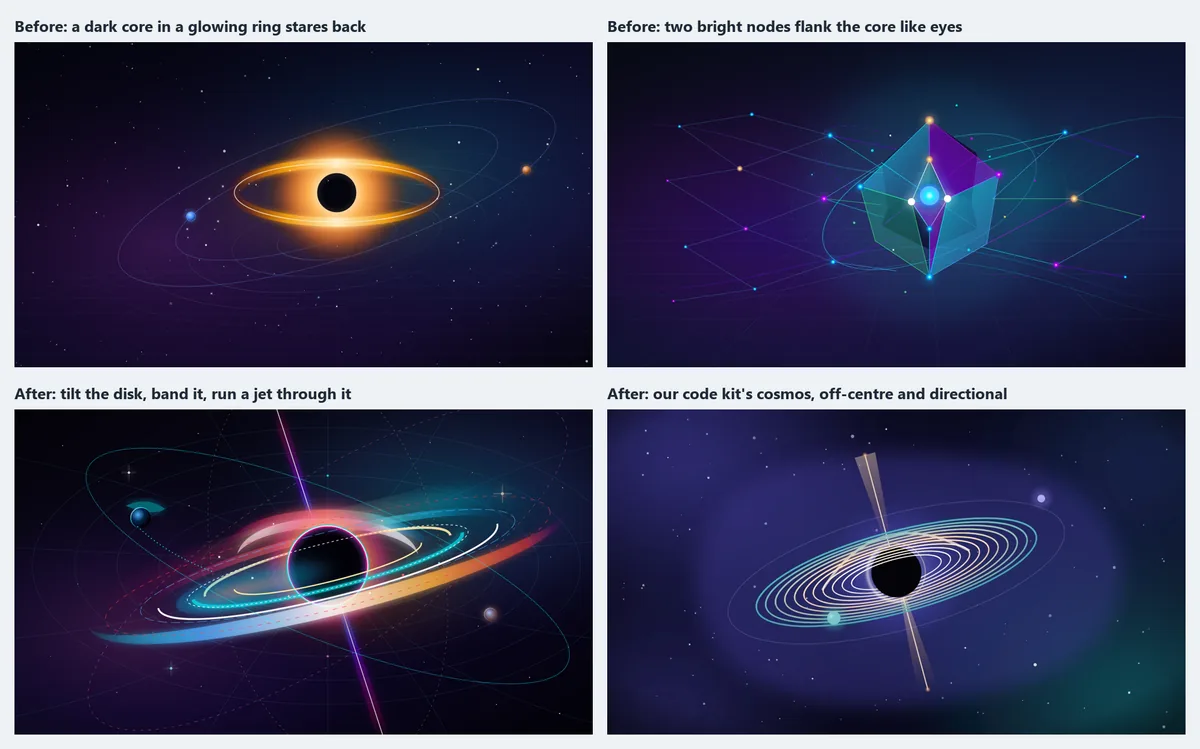
The top row is the trap; the bottom row is moves two, four and five from the list below: give it a direction, let something cross the core, tilt the composition.
Why a glowing center becomes an eye
Three ingredients, all of which the “obvious” composition supplies at once:
- A bright focal point — the core reads as the light of an eye or a pupil highlight.
- A darker surround around it — a ring, disk, or shell becomes the iris and lid.
- Rough bilateral symmetry — the frame is balanced left-right, and eyes are symmetric, so the detector fires.
The human visual system devotes real machinery to finding eyes; it evolved to. So it has a hair-trigger for this exact configuration and will assemble an “eye” from a core, a ring, and symmetry faster than you can compose around it. It isn’t a flaw in your image — it’s your image accidentally speaking the one visual language the brain is most primed to hear.
The rule: give it an axis, not a stare
You don’t have to abandon the centered luminous core — you have to deny the symmetry that completes the eye. Five moves, any one of which usually breaks it, and which combine well:
- Offset the core. Move the focal point off dead center. A pupil isn’t a pupil once it’s not centered in its iris.
- Give the composition a direction. Add a strong axis — a jet, a beam, a rising trajectory, a flow. A directional element tells the eye “this is a thing doing something,” not “this is a face looking at me.” (Polar jets did this for an accretion-disk hero.)
- Let something cross the core. A foreground element transiting the bright center — an orbiting body, a passing line — breaks the clean iris/pupil relationship an eye needs.
- Structure the surround. A smooth ring is an iris; a banded disk, faceted shell, or layered structure is not. Give the surround internal detail so it reads as a mechanism, not a lid.
- Tilt the whole thing. Rotating the composition off the horizontal axis undercuts the left-right symmetry the detector relies on.
The through-line: an eye is centered, symmetric, and static. Add an axis, an asymmetry, or an occluder and the same glowing core reads as a sun, an engine, a singularity — a subject with a story, not a face with a gaze.
An eye is centered, symmetric, and static; give the image an axis and it becomes a subject.
Move the focal point off dead center. A pupil isn't a pupil once it's no longer centered in its iris.
Add a strong axis – a jet, beam, rising trajectory, or flow. 'A thing doing something', not a face staring.
A foreground element transiting the bright center breaks the clean iris-pupil relationship an eye needs.
A smooth ring is an iris; a banded or faceted shell is a mechanism. Give the surround internal detail.
Rotate off the horizontal to undercut the left-right symmetry the eye detector relies on.
An eye is centered, symmetric, and static; add an axis or an asymmetry and it becomes a subject.
It’s perception, not tooling
The tell that this is a perception effect and not a quirk of one tool: we hit it from both directions. A Gemini-written SVG produced a crystalline “core” flanked by eye-like nodes; independently, a Claude-written vector scene put a dark event-horizon shadow inside a glowing disk and produced the same stare. Two different models, writing different code, the same uncanny result — because the eye was assembled by the viewer, not the renderer. That’s why the fix lives in composition, not in a setting: you’re designing around a property of the audience, so bake an asymmetry rule into whatever draws the hero rather than hoping a given render dodges it. (We walk through one such fix end to end in the code-kit bake-off; the broader framing rules are in hero image composition.)
The short version
A bright core inside a darker ring, centered and roughly symmetric, reads as an eye — because human vision is tuned to find eyes, and that’s the pattern. It happens to any engine, so treat it as a perception constraint, not a render bug. Keep the luminous core if you want it, but break the symmetry that completes the eye: offset the core, add a directional element, let something cross it, structure the surround so it isn’t a smooth iris, or tilt the composition. An eye is centered, symmetric, and static; give the image an axis or an asymmetry and it becomes a subject again.
Frequently Asked Questions
Why does my centered glowing hero look like an eye?
Because a bright core, a darker surround, and left-right symmetry are exactly the pattern human vision uses to detect eyes. The composition accidentally supplies all three, and the brain assembles the face.
Is this a rendering bug I can fix with a setting?
No — it’s pareidolia, a property of the viewer, not the renderer. Both AI-generated and code-drawn images hit it. The fix is compositional, not a toggle.
What’s the quickest way to break the effect?
Offset the core from dead center, or add a strong directional element (a jet, beam, or trajectory). Either one denies the symmetry the eye pattern needs.
Do I have to give up the centered glowing core?
No. Keep the core; remove the symmetry. Structure the surrounding ring so it isn’t a smooth iris, let something transit the core, or tilt the whole composition — the glow stays, the stare goes.
Does this apply to photos too, or just illustration?
Any image with a bright center in a darker symmetric surround can trip it, but it’s most common in abstract concept art — cores, nuclei, singularities, energy sources — where the natural composition is exactly the trap.

