A diffusion model does not break rules loudly. It breaks them in a corner, at the edge of the frame, where a quick glance slides right past.
Table of Contents
Why generated images need a gate
A diffusion model turns a prompt into a probability, not a contract. Ask it for a wok with no hands and it will usually comply – but “usually” is not “always,” and a published image with a mistake in it is worse than no image. The gate exists because the model’s output is a draft, never a final. Vector images, drawn shape by shape, need no such gate: an unwanted hand can only appear if someone draws one. So the review discipline below is aimed squarely at the generated, photographic track.
A generated image is a draft, not a deliverable – the review is what turns one into the other.
The failure taxonomy
Across a real batch, the failures clustered into a handful of repeatable types:
- Partial hands and faces. The model pulls in people even when the prompt bans them, and it often crops them at the frame edge where they are easy to overlook.
- Letters that are not letters. Fine repeated texture on an abstract surface reads like text at a glance, even when no real word is present.
- Stray pictograms and diagrams. A tiny human icon, a small pie-chart shape, a card ruled like lines of text – fragments that reintroduce the “no readable UI” problem.
- Figures that drift toward the foreground. A distant silhouette is fine; the same figure a little too close and a little too detailed is not.
Here is a subtle one. This buttercream scene is lovely and on-subject, and the prompt explicitly forbade hands – yet a sliver of a hand rests at the top-right edge, holding the piping bag. There are no clear fingers, just skin at the frame’s corner, which is exactly why it survives a fast look:
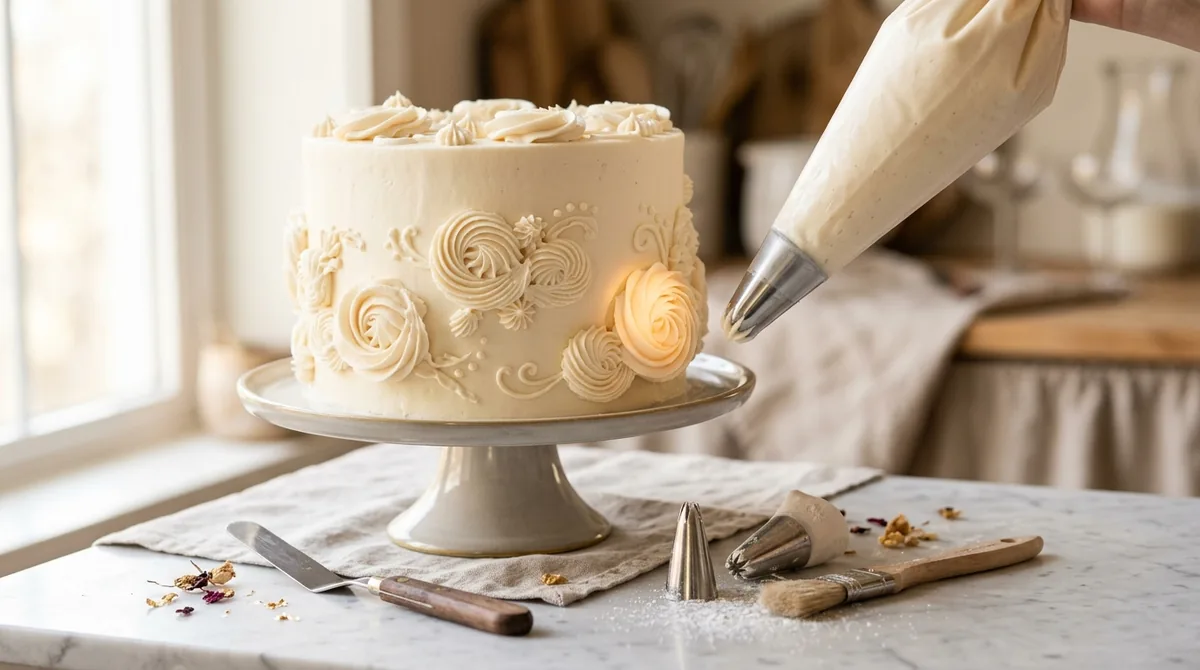
The subtle failures are the dangerous ones
A garbled headline across the center of an image is caught instantly. The failures that reach production are the quiet ones: a hand cropped to a patch of skin, a texture that only resembles writing, a background figure a touch too sharp. Reviewers miss these precisely because the image is otherwise good, and a strong image lulls the eye. So the review cannot be a vibe check – it has to be a deliberate pass against a written list, corner by corner.
The image that passes at a glance is the one that most needs a second, slower look.
A review checklist
Score every generated image against the same fixed questions, in order:
- Subject truth. Does it clearly depict the actual subject, not a generic stand-in?
- No text. Any letters, numbers, labels, or writing-like texture, anywhere, at any size?
- No hands or faces. Including partial ones cropped at the edges – scan into every corner of the frame.
- No stray diagrams or pictograms. Nothing a reader could mistake for data or an interface.
- Palette and coherence. Right mood for the subject, and consistent with the rest of the set?
A single failure on questions two through four is a rejection, not a note. The checklist is fixed so that reviewers cannot quietly lower the bar on a pretty image.
Blind review and re-queue
Review the image before you read its prompt or its intended use, so expectation does not fill in what is not there. When an image fails, name the cause – “partial hand, top-right” – and re-queue the same item with a corrected brief; a failed check bumps the attempt, it does not require redrawing the whole set. Recording the cause also builds a map of which prompts fail how, which is how the prompts themselves improve over time.
The vector track needs no gate
The contrast is the point. Because a hand-drawn vector image is built from shapes you place deliberately, none of these failures is possible – there is no partial hand, no accidental letter, no stray figure, because none was ever drawn. That is why concept subjects are routed to vector in the first place: not only is it cheaper, it removes an entire class of review. Reserve the gate for the photographic track, where approximation is unavoidable and a human check is the only reliable catch.
The short version
AI image QA is the review step that stands between a generated image and a published one. A diffusion model approximates, so it quietly renders the things you banned – usually small, usually at the edges. Check every generated image against a fixed list – subject truth, no text, no hands or faces, no stray diagrams, right palette – review it blind and corner by corner, and re-queue failures with a named cause. Hand-drawn vector art needs none of this, which is a reason to prefer it wherever the subject allows.
Frequently Asked Questions
Why do AI images break rules the prompt clearly stated?
Because a diffusion model treats a prompt as a strong suggestion, not a contract. It renders the most probable image, and sometimes the most probable image includes a hand or a label you forbade. That is why a review step, not a better prompt alone, is what keeps mistakes out of production.
What are the most common AI image failure modes?
Partial hands and faces cropped at the frame edge, texture that resembles text without being real words, stray pictograms or chart shapes, and background figures rendered too close or too sharp. Most are small, which is why they slip past a quick look.
How should I review AI-generated images?
Check each one against a fixed list – subject truth, no text, no hands or faces, no stray diagrams, right palette – and do it before you read the prompt, corner by corner. A blind, deliberate pass catches the subtle failures a glance misses.
What should I do when an image fails review?
Reject it, name the exact cause, and re-queue the same item with a corrected brief. One failure on a hard rule is a rejection, not a note. Logging the cause also reveals which prompts fail most, so the prompts improve.
Do vector or SVG images need the same QA?
No. A hand-drawn vector image cannot contain an unwanted hand, letter, or figure, because each shape is placed on purpose. The review gate is for the generated, photographic track, where the model’s approximation makes mistakes unavoidable.

