Adding FAQ schema takes five minutes. Choosing how to add it, so it doesn’t quietly depend on another plugin’s internals, takes one decision. This covers both routes, what each one actually outputs, and how to check it.
FAQPage structured data) labels part of your page as questions and answers. In WordPress you can add it two ways: an SEO plugin’s FAQ block (Rank Math, Yoast and others have one), or a small snippet that reads an ordinary FAQ section you’ve already written and prints the schema itself. The snippet needs no SEO plugin at all. Since May 2026 Google no longer shows FAQ rich results for any site, so do it for clean, machine-readable markup, not for a search-results accordion. Validate with the Schema Markup Validator.Table of Contents
Is FAQ schema still worth adding?
Yes, as cheap good practice, but be clear about what it no longer does. Google narrowed FAQ rich results to government and health sites in 2023, and in May 2026 stopped showing them for everyone; in June 2026 it removed the FAQ rich-result documentation altogether. When we ran Google’s Rich Results Test on this page in October 2026, it reported “Articles” and nothing about the FAQ.
What remains is the markup itself: valid schema.org data that labels your questions and answers for any system that reads structured data, including AI answer engines. If your FAQ section is generated from content you write anyway, the schema costs nothing to keep.
Google’s FAQ rich results are gone for everyone; the markup is still a free, accurate label on your content.
Before you start
- Pick a method: a plugin’s FAQ block for a few hand-edited posts, or the snippet if you publish at volume or don’t want the schema tied to one SEO plugin.
- Write the FAQ as content. Either way, the questions and answers should be visible on the page.
Method 1: an SEO plugin’s FAQ block (no code)
The fastest route for a few posts, edited by hand. With Rank Math:
- Edit the post and place the cursor where the FAQ should appear.
- Add the FAQ by Rank Math block (type
/faqin the editor). Yoast has an equivalent FAQ block. - Enter each question and its answer in the block fields.
- Update or publish, then validate.
Zero code and an accessible accordion on the page. Two catches. The block stores your Q&A twice, once in the block’s attribute JSON (which drives the schema) and once in the rendered HTML (which drives display), and the two can drift apart under a bad import or a raw find-and-replace. And the plugin decides the shape of the output. When we tested on a lab site, free Rank Math folded the FAQ into the page’s own schema node ("@type": ["WebPage", "FAQPage"]), while Rank Math Pro nested it under the article as subjectOf. Both are legitimate schema.org; neither is a standalone FAQPage node, which matters if something downstream looks for one.
Method 2: a snippet that needs no SEO plugin
Write the FAQ once as ordinary content (an “FAQ” or “Frequently Asked Questions” heading, questions as sub-headings, answers as paragraphs) and let a snippet print a standalone FAQPage script from it. Add it with a code-snippets plugin, a small site plugin, or your child theme’s functions.php. This is the version running on this site:
add_action( 'wp_head', 'mysite_faq_schema', 99 );

function mysite_faq_schema() {
    if ( ! is_singular( 'post' ) ) {
        return;
    }
    $post = get_queried_object();
    if ( ! $post instanceof WP_Post || '' === trim( (string) $post->post_content ) ) {
        return;
    }
    // Stay out of the way of an SEO plugin's own FAQ block: it already emits FAQ schema for this post.
    if ( has_block( 'rank-math/faq-block', $post ) || has_block( 'yoast/faq-block', $post ) ) {
        return;
    }
    // Render blocks, then isolate the FAQ section: from its <h2> up to the next <h2> (or the end).
    $html = do_blocks( $post->post_content );
    if ( ! preg_match(
        '/<h2[^>]*>\s*(?:<[^>]+>\s*)*(?:frequently\s+asked\s+questions|faqs?)\s*(?:<\/[^>]+>\s*)*<\/h2>(.*?)(?:<h2[\s>]|$)/is',
        $html, $m
    ) ) {
        return;
    }
    // Each <h3> in the section is a question; the text up to the next <h3> is its answer.
    $items = array();
    foreach ( preg_split( '/<h3[^>]*>/i', $m[1] ) as $i => $chunk ) {
        if ( 0 === $i ) {
            continue;
        }
        $parts = explode( '</h3>', $chunk, 2 );
        if ( 2 !== count( $parts ) ) {
            continue;
        }
        $q = trim( html_entity_decode( wp_strip_all_tags( $parts[0] ), ENT_QUOTES, 'UTF-8' ) );
        $a = trim( preg_replace( '/\s+/', ' ', html_entity_decode( wp_strip_all_tags( $parts[1] ), ENT_QUOTES, 'UTF-8' ) ) );
        if ( '' !== $q && '' !== $a ) {
            $items[] = array(
                '@type'          => 'Question',
                'name'           => $q,
                'acceptedAnswer' => array( '@type' => 'Answer', 'text' => $a ),
            );
        }
    }
    if ( ! $items ) {
        return;
    }
    $schema = array( '@context' => 'https://schema.org', '@type' => 'FAQPage', 'mainEntity' => $items );
    echo "\n" . '<script type="application/ld+json">'
        . wp_json_encode( $schema, JSON_UNESCAPED_SLASHES | JSON_UNESCAPED_UNICODE ) . '</script>' . "\n";
}
Code language: PHP (php)
The FAQ lives once, as plain content, so there is nothing to keep in sync, and generated or imported posts only need plain headings. The guard near the top means a post that does use a plugin’s FAQ block keeps that block’s schema and never gets a second copy; we tested both cases on a lab site and each post ended up with exactly one FAQ.
To adapt it, edit the frequently\s+asked\s+questions|faqs? wording to match your section label, change is_singular( 'post' ) for pages or a custom post type, or swap the h3 references if your questions sit at a different heading level. It reads only H3s inside the FAQ section, so ordinary sub-headings elsewhere are never mistaken for questions.
Store the FAQ once as plain content and derive the schema from it, so a bulk edit can never desync a copy you forgot existed.
Why we stopped hooking the SEO plugin’s filter
The first version of our snippet didn’t print anything itself. It added a FAQPage entry to Rank Math’s schema through the plugin’s rank_math/json_ld filter and let Rank Math print it. In September 2026, after a Rank Math update, we went looking for that FAQPage entry on our posts and couldn’t find it, so we switched to the self-contained version above.
When we re-tested on a lab site in October, the truth was more interesting: the FAQ hadn’t been dropped. Free Rank Math had merged it into the page node, and Rank Math Pro (which this site runs) had moved it under the article as subjectOf. On category archives the same filter still produced a standalone FAQPage. Same code, three different output shapes, depending on the edition and the type of page.
None of that is wrong, but it’s the lesson: when you hand your data to another plugin’s filter, that plugin decides where and how it appears, and an update can change that without telling you. If the shape of the output matters to you, print it yourself.
Block vs snippet: which one scales?
On a single post they look identical. At volume they are not: the block stores every answer twice; the snippet stores it once.
Q&A saved twice: block JSON (schema) + HTML (display). A bulk edit or bad import can desync them — schema rots while the visible copy looks fine.
FAQ stored ONCE as plain content; schema derived at render. Nothing to sync; bulk publishing needs only plain headings. One filter, one place.
| Plugin FAQ block | Single-source snippet | |
|---|---|---|
| Storage | Q&A stored twice (block JSON + HTML) | Stored once (your content) |
| Output shape | Decided by the plugin (merged or nested) | A standalone FAQPage script |
| Needs an SEO plugin | Yes | No |
| Bulk / programmatic | Must emit valid block JSON + matching HTML | Emit plain headings |
| Failure mode | Per-post silent desync | All-or-nothing, easy to spot |
If you write a few posts by hand and like a visual editor, the block is perfectly fine. If you publish at volume (anything generated, imported or bulk-edited), the snippet wins, and FAQ schema becomes a property you get for free from well-structured content. It’s the same snippet-versus-plugin logic applied to structured data.
How to validate your FAQ schema
- Paste the post URL into the Schema Markup Validator. It lists every schema type it finds and flags errors. Ours reports the FAQ cleanly:
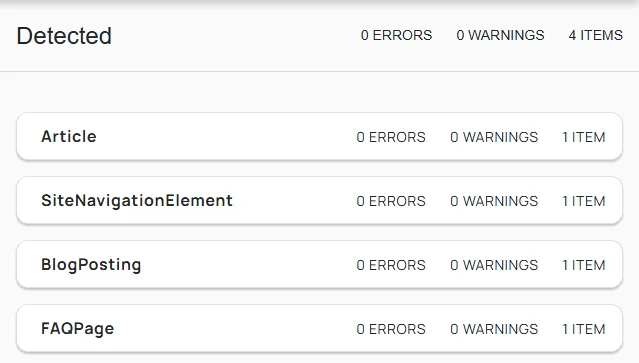
- Or view the page source and search for
FAQPage. - Google’s Rich Results Test still checks other types, but it no longer reports FAQ, so don’t read its silence as a problem.
Troubleshooting the common failures
- Schema not detected at all (snippet method): your FAQ heading wording doesn’t match, or there are no H3 questions under it. Use an H2 literally titled “FAQ” or “Frequently Asked Questions” with H3 questions beneath, and re-test.
- Two FAQ entries reported: a plugin FAQ block and a snippet without the guard are both running on the same post. Add the guard, or remove the block when you move that post to the single-source approach.
- The validator shows the FAQ inside
WebPageor under the article instead of on its own: that’s your SEO plugin’s chosen shape for its block or filter, not an error. - Questions render as gibberish like
u003cstrong: content was imported with double-unescaped Unicode (a dropped backslash, so<became literal text). Restore the escaping or strip the stray tags, then re-save. - Edits don’t show up: a page or SEO cache is serving stale markup. Purge the cache, hard-refresh, and re-validate.
The short version
FAQ schema labels part of your page as questions and answers. Google stopped showing FAQ rich results in May 2026, so add it as clean, free markup rather than for a search feature. Use an SEO plugin’s FAQ block for a few hand-edited posts (it stores every answer twice, and the plugin decides how the schema is shaped), or a snippet that prints a standalone FAQPage from a plain FAQ section (stored once, no SEO plugin needed, with a guard so it never doubles up with a block). Validate with the Schema Markup Validator.
Frequently Asked Questions
Will this show FAQ rich results in Google?
No. Google stopped showing FAQ rich results for all sites in May 2026, and its Rich Results Test no longer reports FAQ markup. The structured data is still valid schema.org that other systems can read, which is why it’s still worth adding when it costs nothing.
Which method should I use, the block or the snippet?
The block for a few hand-edited posts and a visual editor; the snippet for scale, for generated content, or when you don’t want the schema tied to one SEO plugin. The snippet stores the FAQ once as plain content, so bulk edits, imports and migrations can’t silently desync a duplicated copy.
Do I need Rank Math (or any SEO plugin) for this?
No. The snippet prints its own FAQPage script and works without any SEO plugin. You only need one if you want to use that plugin’s FAQ block.
Does the code snippet slow down my site?
Negligibly. It runs a couple of small regexes once per page render, and with page caching the rendered output (schema included) is cached, so it almost never runs.
If I delete the FAQ block, do I lose my schema?
Not if the snippet is installed and your FAQ is plain heading-and-paragraph content: the schema is derived from that content at render time. That is the whole point of a single source of truth.

