Publishing you@example.com in plain text is an open invitation to harvesting bots. The old fix — a document.write script — still works but breaks for screen readers and no-JavaScript visitors. Here’s the current, accessible approach, starting with a function WordPress already ships.
antispambot() is the native, accessible choice: it entity-encodes the address so scrapers miss it while screen readers still read it. A CDN-edge obfuscation (Cloudflare’s Scrape Shield) is the easiest site-wide win; CSS reversal and JavaScript reassembly are weaker fallbacks. The goal isn’t a perfect cipher — just to be more trouble than the millions of un-obfuscated addresses next door, without breaking accessibility.Spam bots crawl the web looking for the name@domain pattern in page source, then flood whatever they find. You can defeat the naive crawlers cheaply — but the goal isn’t a bulletproof cipher (a determined scraper will win); it’s to be more trouble than the millions of un-obfuscated addresses next door, without making the address unusable for real people or invisible to assistive technology.
The methods below are ranked from “best practice” to “last resort.”
The goal isn’t a bulletproof cipher — just more trouble than the address next door.
A contact form exposes nothing to scrape. Every option below this one is damage limitation.
WordPress already ships it. Entity-encodes the address, and a screen reader still reads it out correctly.
Reversed in the markup, restored in CSS. Needs no JavaScript — but it breaks copy and paste for everyone.
Published in the clear and harvested within days. Every technique above exists because of this one.
Accessibility is the tiebreak: an address a harvester cannot read but a screen reader can is the only good outcome.
Table of Contents
Best practice: don’t publish the address at all
The address a bot can’t see is the one it can’t harvest. Two options cover almost every case:
- Use a contact form instead of a visible address. The email lives server-side in the form config, never in the page. Add a honeypot field (a hidden input real users leave empty; bots fill it, and you reject those submissions) and basic rate-limiting — that stops far more spam than obfuscating a visible address ever will.
- Route through a role alias (
contact@,support@) you can filter or rotate, rather than a personal inbox you can never change once it’s scraped.
If you genuinely need a clickable address on the page, use one of the following.

The address a bot can’t see is the one it can’t harvest.
WordPress already has a function for this: antispambot()
Before installing anything, know that WordPress core ships antispambot() — it converts an email into randomized HTML character entities (j etc.) that render as normal text in a browser but don’t match the plain name@domain pattern bots scan for. It’s the native, dependency-free answer.
A small Code Snippet (use a snippet manager, not functions.php) turns it into a reusable shortcode:
add_shortcode('safe_email', function ($atts) {
    $a = shortcode_atts(['address' => '', 'text' => ''], $atts);
    if (!is_email($a['address'])) return '';
    $enc  = antispambot($a['address']);
    $label = $a['text'] ? esc_html($a['text']) : $enc;
    return '<a href="mailto:' . $enc . '">' . $label . '</a>';
});
Code language: PHP (php)
Then write [safe_email address="you@example.com"] in any post. The rendered source contains only entities, the link works normally, and — crucially — it stays fully accessible: screen readers and no-JS visitors get a real, readable, clickable address, because nothing depends on JavaScript.

Nothing here depends on JavaScript, so it stays fully accessible.
CSS reversal — no JavaScript, defeats simple scrapers
Store the address backwards in the markup and flip it visually with CSS, so what a bot reads is reversed nonsense while a human sees it correctly:
<span class="rmail">moc.elpmaxe@uoy</span>Code language: HTML, XML (xml).rmail { unicode-bidi: bidi-override; direction: rtl; }Code language: CSS (css)Cheap and JS-free. Caveat: it’s display-only (not a working mailto: link), and copy-paste yields the reversed text — so it suits “here’s our address” more than a click-to-mail button. It also reads backwards to some screen readers, so pair it with an accessible label if assistive-tech support matters.

JavaScript reassembly — strongest obfuscation, with a fallback
Split the address into parts and assemble the link only in the browser, so it never appears whole in the served HTML:
<a id="c" href="#" data-u="you" data-d="example.com"></a>
<script>
  var a = document.getElementById('c');
  var e = a.dataset.u + '@' + a.dataset.d;
  a.href = 'mailto:' + e; a.textContent = e;
</script>
<noscript>Email: you [at] example [dot] com</noscript>
Code language: HTML, XML (xml)
The whole address is never in the static source, and the <noscript> block gives no-JavaScript visitors a human-readable fallback — the accessibility gap the old document.write method left open. This is the strongest of the on-page methods; the trade-off is that it relies on JavaScript for the clickable link.
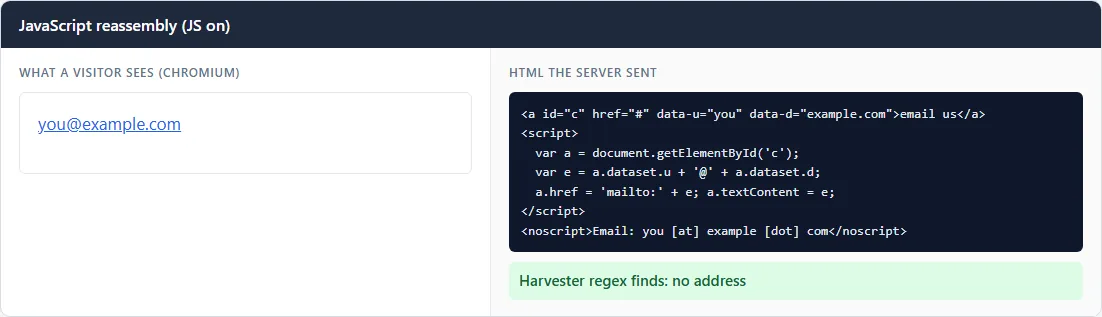
Many versions of this pattern put placeholder text such as “email us” inside the link, as in these renders. With JavaScript off, that link stays on the page as a dead “email us” pointing at #, right next to the <noscript> fallback. That is why the code above leaves the link text empty: the script fills it in, so visitors without JavaScript see only the readable fallback.
![The same JavaScript reassembly markup rendered in Chromium with JavaScript off: the noscript fallback reads "Email: you [at] example [dot] com", next to a leftover "email us" link that goes nowhere because the script never ran.](https://bosonica.in/wp-content/uploads/2026/10/vault-email-obfuscation-js-reassembly-nojs.webp "How to Protect Email Addresses from Spam Bots in WordPress (the Modern, Accessible Way) 5")
The whole address never appears whole in the served HTML.
The easiest win of all: let your CDN do it
If your site is behind Cloudflare, its Scrape Shield includes automatic email obfuscation — it rewrites addresses in your HTML on the fly, no code required. Turn it on and every address on the site is obfuscated at the edge. Many managed hosts offer an equivalent. This is often the highest value-for-effort option — a CDN in front of your site tends to earn its keep several ways at once.
The short version
Layer it, matched to the address’s exposure:
- Prefer a contact form + honeypot wherever a form fits — the address stays off the page entirely.
- For a visible, clickable address, use the
antispambot()shortcode (accessible, native, no dependency), or Cloudflare’s automatic obfuscation if you’re behind it. - Reserve JavaScript reassembly for a high-value address you want hidden from the static HTML, always with a
<noscript>fallback. - Treat CSS reversal as a display-only nicety, not your main defense.
No method is permanent — rotate a role alias if an address does start attracting spam, and lean on your mail provider’s spam filtering as the backstop. The point is to stop being the easy target — the same bot-hygiene mindset as making sure your maintenance page answers 503, not 200.
Frequently Asked Questions
Does email obfuscation actually stop spam?
It stops the cheap, high-volume harvesters that scan page source for the plain name@domain pattern — which is most of them. It won’t stop a determined scraper that renders JavaScript, so treat it as one layer alongside a contact form, a honeypot, and your mail provider’s spam filter rather than a complete fix.
Do I need a plugin to obfuscate an email in WordPress?
No. WordPress core includes antispambot(), which encodes an address into HTML entities. A few lines in a Code Snippet turn it into a reusable shortcode — no plugin required. If your site is behind Cloudflare, its automatic email obfuscation needs no code at all.
Is obfuscating an email bad for accessibility?
It can be, if done carelessly. The old document.write method leaves no-JavaScript users and some screen readers with nothing. Prefer the antispambot() entity method (fully readable and clickable with no JS), or if you use JavaScript reassembly, always include a <noscript> fallback with a human-readable address.
Should I just use a contact form instead?
Usually, yes. A contact form keeps the address off the page entirely, and adding a honeypot field stops far more spam than obfuscating a visible address. Use a displayed address only when people genuinely need to mail you directly.

