A companion to the diagnosis story. Once we knew a single SEO crawler had drained a month’s CDN budget in three days, stopping it looked trivial: flip a toggle, edit a file. It took four attempts — and the three that failed all failed for the same reason. Not effort. Position.
Having proven the culprit — one reputable SEO crawler walking 127,000 product URLs from a rotating pool of datacenter proxies — the fix seemed like a five-minute job. It was not. The obvious levers each did nothing, and each taught the same lesson: a blocker only stops what actually reaches it, and every cache or proxy in front of it is a blind spot.
A request path is the ordered set of layers a request crosses — CDN edge, web server, page cache, PHP, application — before a page comes back. Where you place a block on that path decides whether it ever sees the traffic you are trying to stop. We placed it wrong three times.
.htaccess/LiteSpeed), which runs before the page cache. Three of our four attempts did nothing, and the difference was never effort; it was position. A block placed behind the page cache (a security plugin in PHP) or behind a bypassed CDN edge never sees the cached hits it is meant to catch, so it silently returns 200. The .htaccess user-agent rule worked because it sits in front of the cache, across every rotating IP. And match the tool to the bot: name-based rules only catch crawlers that announce themselves — a scraper spoofing a browser needs IP, rate, or challenge measures.Table of Contents
Where to block bots on LiteSpeed: the request path
The bot reads it first. Honest bots only, and only next crawl cycle.
Under Attack Mode challenges HERE.
Web-server door, BEFORE the cache. Catches every IP. This is the fix.
Serves cached pages before PHP even runs.
UA + rate block — but never sees a cached hit.
A blocker only stops what reaches it. Every cache in front of it is a blind spot — so enforce at the outermost layer the traffic actually passes through.
Read it left to right — that is the order a request crosses the layers. Three are red: they failed or were blind. The one that worked sits at exactly the point every request must pass, in front of the cache.
Attempt 1 — The CDN toggle
Expectation: the CDN has an “Under Attack Mode” — a one-click challenge that makes every visitor pass a lightweight check before being served. Flip it, bots stop.
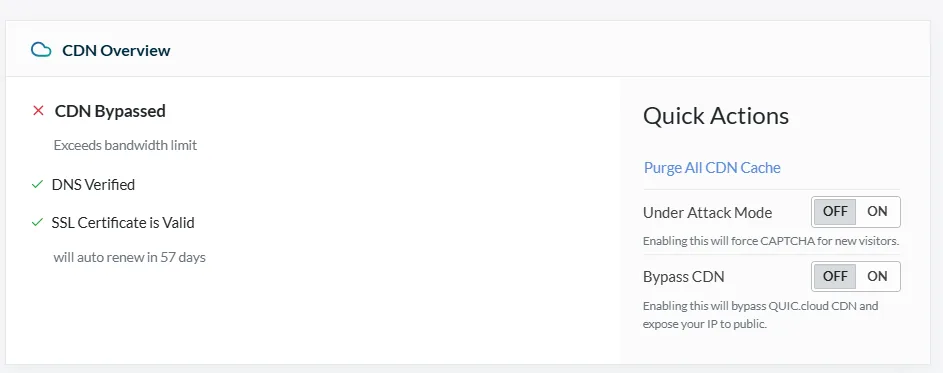
Reality: nothing changed. The clue was on the same panel — “CDN Bypassed — exceeds bandwidth limit.” Having blown its quota, the CDN had taken itself out of the path; traffic was falling straight through to the origin. Under Attack Mode is an edge feature, and the edge was no longer serving the site. A challenge at a layer that is not in the request path challenges nobody. The toggle only helps once the quota resets and the edge is fronting traffic again.
An edge feature cannot act on traffic the edge is no longer serving.
Attempt 2 — robots.txt
Expectation: add Disallow: / for the crawler and it leaves.
Reality: three surprises. First, there was no robots.txt in the web root to edit — WordPress serves a virtual one, generated on the fly, so the file only exists at the URL, not on disk. Second, once edited, it changed nothing immediately: robots.txt is a request honest bots re-read on their own schedule — hours, not seconds — and it does nothing to bots that ignore it. Third, a subtle foot-gun: dropping the crawler rules above the existing User-agent: * block orphaned the store’s WooCommerce rules, briefly leaving normal search engines unrestricted. robots.txt is a request that compliant crawlers re-read on their own schedule, never an enforced block — the polite layer: worth setting, but slow, optional, and honor-system.
Attempt 3 — The security plugin
Expectation: the site runs a well-known security plugin with a firewall. Block the crawler’s user-agent there and it dies at the door.
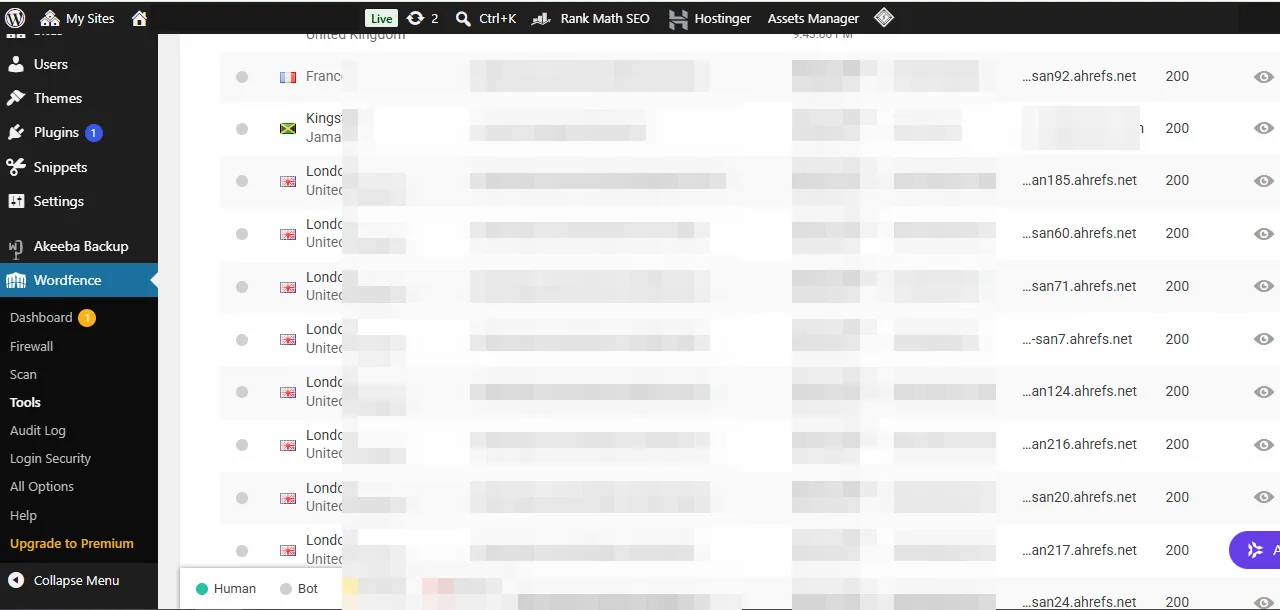
Reality: the block was real, and it still returned 200. The plugin runs in PHP — and on LiteSpeed the page cache serves a cached page before PHP ever loads. With an aggressive cache TTL, essentially the whole catalog was cached, so the crawler’s hits were answered by the cache and never reached the plugin. We proved it with two requests:
# cached homepage — the plugin never runs
curl -sI -A "…AhrefsBot…" https://example-store/    →  200   X-LiteSpeed-Cache: hit

# a cache-miss URL — now PHP runs, and the plugin DOES block
curl -sI -A "…AhrefsBot…" "https://example-store/?bust=1739"  →  503  (block page)
Code language: Bash (bash)
The plugin works — but only on cache misses. It is the same blind-spot as the CDN, one layer deeper: a cache in front of your blocker hides the very traffic you are hunting. (A per-IP rate limit had the same problem for a different reason — the crawler spread its load across dozens of proxy IPs, so no single-IP counter ever tripped.)
A cache in front of your blocker hides the very traffic you are hunting.
Attempt 4 — The .htaccess rule (the fix)
Expectation: by now, low. It was the one that worked.
The web server (LiteSpeed here, Apache elsewhere) evaluates .htaccess before it serves the page cache. A mod_rewrite user-agent rule there returns 403 at the door — in front of the cache, before PHP, across every rotating IP, cached URL or not:
<IfModule mod_rewrite.c>
RewriteEngine On
RewriteCond %{HTTP_USER_AGENT} (AhrefsBot|SemrushBot|GPTBot|…) [NC]
RewriteRule .* - [F,L]
</IfModule>
Code language: Apache (apache)
We verified it was genuinely the .htaccess doing the work — not the plugin block still lingering — by testing user-agents that were only in the .htaccess list, never in the plugin:
curl -sI -A "SemrushBot"  https://example-store/  →  403   (787 B)   # only in .htaccess
curl -sI -A "GPTBot"      https://example-store/  →  403   (787 B)   # only in .htaccess
curl -sI -A "Googlebot"   https://example-store/  →  200             # correctly spared
Code language: Bash (bash)
The 403 (a small web-server page) is a different fingerprint from the plugin’s 503 (a large block page) — proof it was intercepted at the web-server layer, before anything deeper ran. (The status code you serve is a signal in its own right: a maintenance page, for instance, should answer 503, not 200, or crawlers treat the placeholder as real content.)
The expectation-versus-reality ledger
| Attempt | Expectation | Reality | Root cause |
|---|---|---|---|
| CDN “under attack” toggle | Instant challenge stops bots | No effect | Edge was bypassed — out of the request path |
| robots.txt disallow | Crawler leaves | Slow, honor-system, no file to edit | A request, read next crawl cycle; virtual file |
| Security-plugin UA block | Dies at the door | 200 on cached pages | Plugin is in PHP — behind the page cache |
.htaccess UA 403 | (Low) | Worked | Web-server layer — in front of the cache |
Same lesson four times: the block has to live at the outermost layer the traffic actually crosses.
Enforce at the outermost layer the traffic crosses, or enforce nothing at all.
The part nobody expected: the swarm behind the swarm
Blocking the top crawler surfaced a second problem. Watching live traffic afterwards, a mix of other bots filled the gap — and only some were nameable (other SEO and AI crawlers, added to the same list; the reputable ones even publish their bot tokens so you can target them). A large share were datacenter scrapers spoofing an ordinary browser user-agent — one announced itself as a Chrome version that does not exist, from a hosting provider’s IP. No user-agent rule can catch a bot that lies about its user-agent. That traffic needs a different toolset entirely: per-IP rate limits (partial, against rotating proxies), datacenter/ASN or hostname blocks, or a CDN challenge once the edge is back in the path. User-agent blocking cleans up the honest bots — the same tactic that hides an email address from harvesting bots works on the crawlers that identify themselves; it just has a hard ceiling at the dishonest ones.
A name-based rule cannot stop a bot that lies about its name.
The short version
Blocking bots on LiteSpeed is a placement problem, not an effort problem. Put the rule at the outermost layer every request crosses — the web server (.htaccess/LiteSpeed), in front of the page cache — because anything ahead of it (a bypassed CDN edge, a full-page cache) can answer a request before the rule ever runs. That is why robots.txt, the CDN toggle, and the in-PHP security plugin all missed, and the .htaccess 403 did not. And when a bot spoofs its user-agent, stop reaching for name-based rules: switch to IP, rate, or challenge measures that judge behavior instead of a label the bot controls.
Frequently Asked Questions
Why didn’t my security plugin block the crawler even though I added the rule?
Almost certainly because a page cache sits in front of it. Plugins like Wordfence run in PHP, and a full-page cache (LiteSpeed, Varnish, a CDN) serves a cached page before PHP loads — so the plugin never sees a cached request and can’t block it. It will still catch cache misses. To block cached hits, move the rule to the web-server layer (.htaccess/LiteSpeed) or exclude the bot’s user-agent from caching.
Where is my robots.txt if there’s no file in the web root?
WordPress serves a virtual robots.txt — generated dynamically, existing only at the /robots.txt URL, not on disk. Edit it through your SEO plugin, or drop a real file in the web root to override the virtual one. Either way, remember robots.txt is a request compliant bots honor on their own schedule, not an enforced block.
Why doesn’t the CDN’s “under attack” mode stop the bots?
If your CDN shows “bypassed” or “over quota”, it has taken itself out of the request path — traffic is going straight to your origin, and an edge-level challenge can’t run on traffic the edge isn’t serving. The toggle only works while the CDN is actively fronting your site.
Will blocking user-agents stop all the bots?
No — only the ones that announce themselves. Datacenter scrapers that spoof a normal browser user-agent are invisible to name-based rules. For those you need per-IP rate limiting, hostname or ASN blocks, or a challenge/bot-management layer that judges behavior rather than the user-agent string.
Is an .htaccess block safe on a live site?
It is powerful and therefore worth testing: a user-agent pattern that is too broad can 403 real visitors or the search engines you want. Keep the list to specific bot tokens, exclude the crawlers you value (Googlebot, Bingbot, your social unfurlers), and verify with curl -A right after — a bad bot should get 403 while a normal browser and the major search bots still get 200.

