When a content-delivery budget empties in seventy-two hours, the instinct is to blame a traffic spike. Almost always it is the opposite of an audience — it is automated crawlers finding a page count you forgot you had. Here is how to prove that in three cheap checks, then shut it down step by step.
curl with a crawler user-agent gets the full page, unchallenged), and the arithmetic (your sitemap’s URL count times page weight, against your monthly meter). Then shut it down cheapest-first — a CDN challenge layer to stop the bleeding now, robots.txt disallows for the crawlers you gain nothing from (which removes the biggest offender, since the worst is usually a reputable SEO crawler that honors it), a server-level 403 for the ones that ignore it, and, the durable fix, shrinking the crawlable surface.A free content-delivery-network plan carried roughly six gigabytes of monthly transfer. Three days into the cycle it was gone, the CDN had flipped to “bypassed — exceeds bandwidth limit,” and every request was now falling through to the origin server. Nothing had launched. No campaign had run. The store had not suddenly become popular.
A CDN transfer budget is the total bytes the edge caches are allowed to ship out in a cycle, to anyone who asks — human or machine. Exhausting it means something pulled a lot of bytes; it does not mean an audience arrived. Here, the something was crawlers — unrestricted, and handed a hundred and twenty-seven thousand pages to walk.
Table of Contents
The problem: a month’s budget, gone in three days
The dashboard showed the CDN had served its full monthly allowance and switched to bypass mode — requests were no longer answered from the edge at all, they were passing straight through to the origin. That is the worst of both states: the budget is spent and the origin is now taking the raw load the CDN existed to absorb.
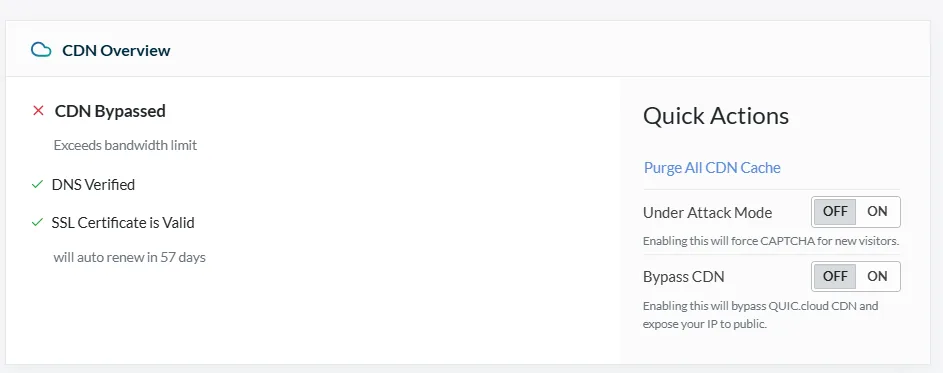
The number that mattered was not the total, it was the rate: a whole month’s transfer consumed in three days is a tenfold-plus overshoot. Human traffic does not arrive as a clean 10× step with no launch behind it. Automated traffic does, because a crawler does not ramp — it starts, and it pulls as fast as it is allowed.
Why a CDN can’t save you from this
A content delivery network is a fleet of edge caches in front of your site; on metered plans, what you buy is egress — the total bytes the edge ships out to whoever asks. And the edge cannot tell a customer from a crawler. A request is a request; bytes go out; the meter moves. Which is why a bigger cache does not fix this — it just serves the whole catalog to the bots more efficiently.
The edge cannot tell a customer from a crawler; a request is a request, and the meter moves.
Proving it was bots, not customers
Three checks, in order, each cheaper than the last to run and each independently damning.
1. The geography named the culprit
The single most useful panel was the geographic breakdown of where the bytes went. For a store whose catalog and customers are overwhelmingly in one country (call it the home market), the distribution should lean heavily toward that country’s cities. It did the reverse:

Read the smallest bar. The country the store is actually built for accounted for about one byte in thirty. The top half of the traffic was a single European cloud hub — a place with no plausible population of shoppers for this catalog, and every plausible population of servers. That split — concentrated in two or three named cloud regions, near-absent in the real audience’s cities — is the signature of datacenter crawlers, not people. Humans are geographically messy; crawler fleets cluster in the handful of regions where compute is cheap.
2. The site was serving every bot in full
Two quick origin checks, both of which you can run against your own site in a browser or with a single command.
First, what the site tells bots. Its robots.txt — the file where a site declares which automated agents may fetch what — blocked essentially nothing: no rule for the AI-training and AI-search crawlers that have become the heaviest new source of automated fetching, no rule for the aggressive commercial SEO scrapers, nothing throttling crawl of the product pages.
Second, test the bots directly. Request a page while presenting a crawler’s identity — its user-agent, the label every client sends to say what it is. One after another, the major crawlers were served the full page at full byte cost, unchallenged:
$ curl -sI -A "AhrefsBot/7.0"  https://example-store/<product>   →  HTTP/2 200   (full page)
$ curl -sI -A "GPTBot/1.0"     https://example-store/<product>   →  HTTP/2 200   (full page)
$ curl -sI -A "SemrushBot/7"   https://example-store/<product>   →  HTTP/2 200   (full page)Code language: JavaScript (javascript)
Nothing was challenged. Nothing was rate-limited. The site was serving its entire catalog to anything that asked.
3. The arithmetic: a 25 GB liability behind a 6 GB meter
This is the check that turns “bots are hitting us” into “of course the budget is gone.” The store exposed its catalog through sitemaps — the machine-readable index bots use to discover every URL. Counting them revealed roughly 635 product sitemaps of about 200 URLs each: on the order of 127,000 product pages, before categories, tags, filters, and paginated archives inflate it further. Worse, on a WordPress/WooCommerce site every one of those pages also exposes a /feed/ endpoint (its comment RSS), and crawlers fetch both — so the real crawlable surface is closer to double the page count.

One complete crawl by one bot is roughly four times the entire monthly allowance. And the traffic was not one bot — the geography and the user-agent tests showed several crawling concurrently. The budget was never going to survive a week. The only surprise is that it lasted three days. The bill was not a bandwidth problem, it was a crawl-surface problem.
The size of your sitemap is the size of the target.
4. Naming the bot (and minding where your logger sits)
Geography and arithmetic describe a type of traffic; for a name you need a per-request log with user-agents — and here a subtle trap lives. Your security plugin sits at the origin, behind the CDN. Every request the CDN served from its edge cache — exactly the traffic that spent the budget — never reached the origin, so the plugin cannot see it. A live-traffic tool can only show what gets past the cache.
That constraint flips into an advantage the moment the CDN is bypassed (as it was, being over quota): now all traffic falls through to the origin, and a brief window of full-traffic logging, filtered to crawlers, names names.
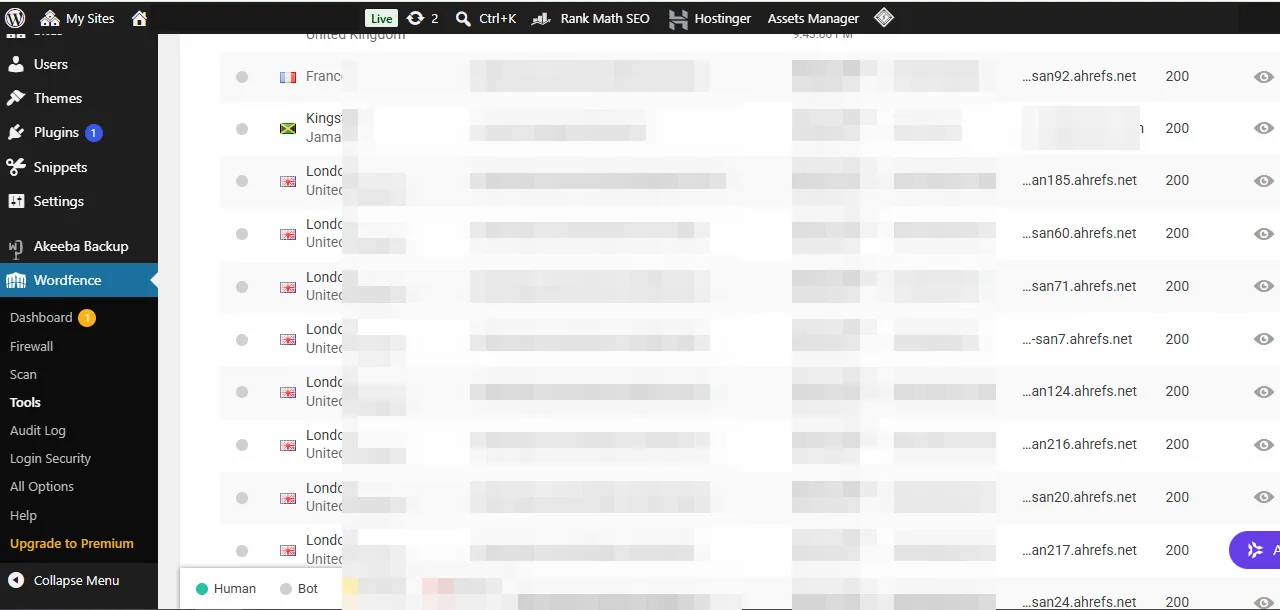
In this case it was overwhelming and immediate: in a seventy-second sample, almost every crawler hit was a single commercial SEO crawler (AhrefsBot), fetching one page every one to three seconds from a rotating pool of datacenter proxies — overwhelmingly one Western-European hub, the exact region that dominated the CDN’s byte geography. Two independent measurements, the same machine. A general search engine’s crawler appeared too, but as a rounding error beside it.
The lesson for your own diagnosis: don’t trust an origin-side logger to exonerate anyone while the CDN is serving cache — it is blind to the cached hits by construction. Read it during a bypass, or read the CDN’s own edge log, or you are measuring the wrong side of the wall.
A cache hit still ships bytes, and your origin log never sees it.
The mitigation, step by step (cheapest first)
The order is deliberate: an instant challenge to stop the bleeding, then the polite signal that removes the biggest offender, then the hard block, then the structural fix. None of these should be pasted onto a live production site blind — a bad server rule can take a site down as thoroughly as any outage — so stage and test each one. (For where on the request path each block belongs — and why the obvious placements silently fail — see the companion piece, which layer actually stops a bot.)
Disallow the SEO and AI crawlers you gain nothing from. Honest bots obey — next cycle.
Block the ones that ignore robots.txt. The request dies at the door — no bytes.
Challenge mode plus fewer crawlable URLs. The durable fix — so next month survives.
Layers 1-2 can be live within an hour and stop the bleeding. Layer 3 is what keeps next month's budget from evaporating the same way.
Step 1 — Turn on the CDN’s challenge mode (minutes)
Most CDNs expose an under-attack or bot-challenge toggle that forces a lightweight check before serving — visible in the status panel above. It is the only lever that works immediately, before any crawler re-reads a file, so it is the right first move when the budget has just tripped. Turn it off again once the crawl subsides and the durable fixes are in.
Step 2 — Disallow the crawlers in robots.txt (a crawl cycle)
Add explicit Disallow: / blocks for the crawlers you gain nothing from — the commercial SEO scrapers and the AI-training and AI-search agents. This is the cheapest lever and the one that removes the largest single slice of load here, because the biggest consumer was a reputable SEO crawler and that class honors robots.txt; it just takes a crawl cycle to take effect rather than being instant. None of these crawlers send you customers, so you lose no legitimate traffic:
# Bandwidth-abusing SEO crawlers — the confirmed #1 here
User-agent: AhrefsBot
User-agent: SemrushBot
User-agent: DotBot
User-agent: MJ12bot
User-agent: DataForSeoBot
User-agent: BLEXBot
Disallow: /

# AI training / scraper crawlers — no referral traffic
User-agent: GPTBot
User-agent: ClaudeBot
User-agent: CCBot
User-agent: Google-Extended
User-agent: Bytespider
Disallow: /Code language: PHP (php)
Google-Extended governs AI training without touching your normal search ranking, so it is safe to disallow. (Blocking the AI-search agents — the ones that cite you in generated answers — is the one trade-off worth a conscious choice: it saves bytes but forgoes those citations.)
Step 3 — Hard-block the ones that ignore robots.txt (server rules)
A robots.txt entry is a polite request; the worst offenders ignore it. For those, a server-level user-agent block returns a 403 Forbidden before a single page byte is generated — the request dies at the door. This is the tier that actually protects the budget against scrapers, and the most dangerous to get wrong: match too broadly and you can 403 your real visitors or the search engines you want. Stage and test it precisely; never paste it from a forum.
Step 4 — Shrink the target (structural, durable)
The durable fix is that 127,000 open URLs is too much surface. In rough order of leverage: keep the challenge layer from Step 1 in place for bot management; reduce what is even crawlable — thin product pages, filter-and-sort URL explosions, and low-value archives such as the /feed/ endpoints are pure crawl cost with no audience; and cache aggressively at the origin so the pages that do get served cost as little as possible when the CDN is bypassed.
Steps 1–3 can be live within an hour and stop the bleeding. Step 4 is the one that means next month’s budget does not evaporate the same way.
The short version
A CDN budget that empties far faster than your visitor count can explain is a crawl-surface problem, not a popularity one — and three cheap checks prove it past any “traffic spike” excuse: the rate (a month in three days), the geography (97% of bytes served away from the home market, into cloud hubs), and the arithmetic (a 25 GB single-crawl liability behind a 6 GB meter); the live-traffic log then named one dominant SEO crawler from the very region the geography had fingered. On a free tier, a large open catalog and unrestricted crawlers are simply incompatible, and no dashboard setting alone reconciles them — gating the crawlers (a challenge layer, then robots.txt, then a server 403, then a smaller crawl surface) is both the cheapest fix and the one that should have been in place from the day the catalog got large. So don’t start by buying more bandwidth; start by asking “how many URLs do I expose, and who is actually pulling the bytes?”
Frequently Asked Questions
My CDN bandwidth is exhausted — does that mean my site got popular?
Usually not, especially if it happened fast and with no launch behind it. “Bandwidth exhausted” only means something requested a lot of bytes, and unrestricted automated crawlers request far more than a normal audience. Check where the bytes went geographically: if a site built for one country is serving most of its traffic to datacenters elsewhere, the “visitors” are machines, not customers.
How can I tell crawler traffic from real visitors?
Two fast signals. First, geography: real audiences cluster in the cities where your customers live, while crawler fleets cluster in a few cloud-datacenter regions. Second, the user-agent breakdown in your access log: crawlers announce themselves (AI crawlers, SEO scrapers, search indexers), and if a handful of user-agents account for most of your bytes, that is your answer.
Does robots.txt stop bots from using my bandwidth?
Only the honest ones. robots.txt is a published request that well-behaved crawlers voluntarily follow; aggressive scrapers routinely ignore it. It is worth setting because it removes the compliant crawlers cheaply — including, here, the single biggest consumer — but the bots most likely to drain your budget need a server-level block (a 403 Forbidden on their user-agent) or a challenge layer to actually stop them.
Will a bigger cache or a CDN plan upgrade fix this?
Not on its own. A cache hit still ships bytes out of the edge, so against a crawler walking every URL once, efficient caching just means you serve your whole catalog smoothly — the meter still runs. If your crawl surface is tens of thousands of pages, the fix is to reduce that surface and gate the crawlers first; a plan upgrade only buys time if you also close the door.
Why does the number of pages on my site matter so much?
Because your total crawlable URL count is the size of the target. A store with 127,000 product pages offers a bot 127,000 things to download, and at even 0.2 MB per page a single full crawl is around 25 GB — several times a typical free-tier monthly budget. The larger your catalog, the more essential it is to gate crawlers and trim low-value URLs, or a single crawl pass can spend a month’s allowance by itself.
What is the fastest thing I can do right now if my budget just tripped?
Turn on your CDN’s bot-challenge or “under attack” mode if it has one — it forces a lightweight check before serving and stops the bulk of automated traffic within minutes. Then add robots.txt disallows for the crawlers you gain nothing from, and stage a tested server-level block for the ones that ignore it. Do the structural work — shrinking the crawl surface — once the immediate bleeding has stopped.

