Network Admin lists the plugin as Inactive and offers Delete, yet some of your sites may still run it. Delete it there and those sites lose it without an error, while its data stays behind on each of them.
Table of Contents
One copy of the files, a switch on every site
Picture a shared drive at work with one installed copy of an app, which each team switches on for itself. The IT dashboard shows only whether the app is switched on for the whole company. If IT deletes the copy because the dashboard says “off”, every team that had switched it on loses it the same morning.
A multisite works the same way. The plugin folder exists once, and every site loads it from there. Activation comes in two kinds:
- Network activation, by a super admin in Network Admin, runs the plugin on every site and is stored once for the network.
- Per-site activation, on one site’s own Plugins screen, runs it there only and is stored in that site’s settings. A super admin can always do this; a site’s own admin can too, if the network lets site admins manage plugins.
The Plugins screen in Network Admin reports the first kind. The second kind lives in each site’s settings, and the network screen doesn’t add it up.
On a multisite, “inactive” in Network Admin means “not network-activated”. It does not mean “unused”.
What Network Admin shows while two sites use the plugin
To see it happen, take a three-site test network (the main site, /alpha/ and /beta/) running WordPress 7.0.2. A throwaway plugin was switched on in /alpha/ and /beta/ only, and its footer marker appeared on both of those front pages. Here is where it stood, and what Network Admin → Plugins showed:
network-active:  no
main site:       not active
/alpha/:         active
/beta/:          active
Network Admin:   listed under "Inactive", actions: Network Activate | DeleteCode language: JavaScript (javascript)
Nothing on that screen says two sites run the plugin. The filter tabs agreed: every plugin on the network, this one included, was counted as inactive.
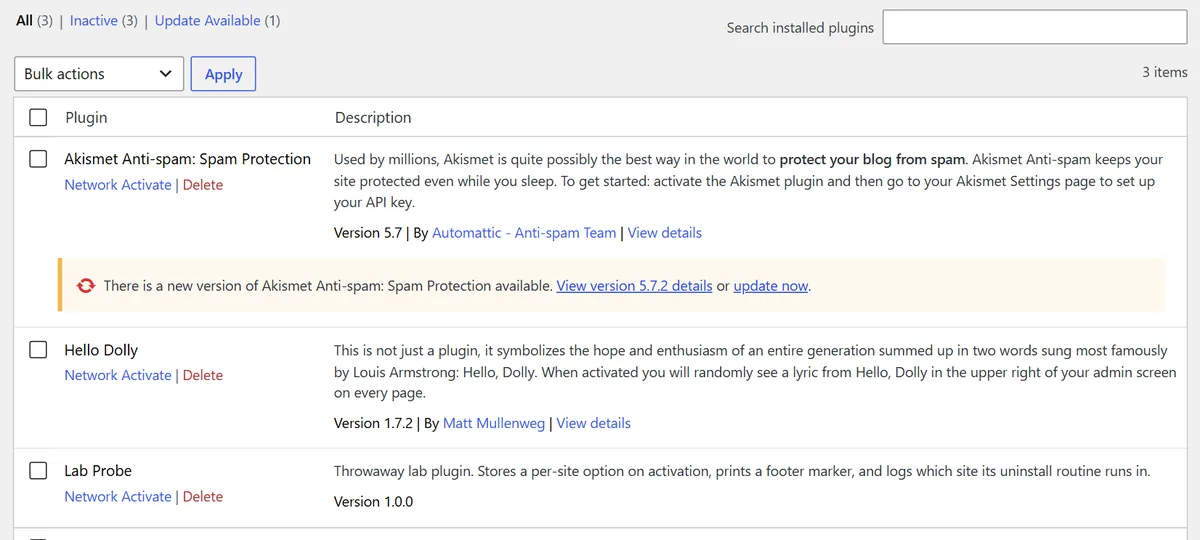
The warning says nothing about other sites
Click Delete under the plugin and the browser asks a single question: “Are you sure you want to delete Lab Probe and its data?” That is the whole warning. Tick the plugin and use Bulk actions → Delete instead, and the question becomes whether you want to delete “the selected plugins and their data”. Neither mentions the two sites still running it.
WordPress does have a sentence for this case, “This plugin may be active on other sites in the network.”, but it sits on a fallback confirmation page that appears only when JavaScript is turned off. Even there it is printed for every plugin that isn’t marked network-only, without looking at the sites first. Themes, oddly, get the warning in the normal flow: bulk-deleting themes in Network Admin asks you to confirm although they “may be active on other sites in the network”. Plugins don’t get that line.
The check that actually decides whether the delete is allowed asks two questions: is the plugin active on the main site, and is it network-activated? Its refusal reads “You cannot delete a plugin while it is active on the main site.” The test plugin was neither, so the delete went ahead.
What deleting it does to the sites still using it
After confirming the dialog, the row changed to “Lab Probe was successfully deleted.” The files went. On /alpha/ and /beta/:
- The front ends kept working. Both returned a normal page, with no error and no notice. The plugin simply stopped running: its footer marker was gone.
- Their settings still listed it as active. Each site’s own list of active plugins kept the entry, now pointing at files that no longer exist.
- The first sign appears later, in that site’s admin. When someone opens that site’s Plugins screen, WordPress checks the active list, finds the file missing, removes the entry and shows the notice below, once. On the next visit it is gone.

That silence is the dangerous part. A plugin that filters content, redirects old URLs or guards a login keeps its job right up to the delete, and then the job just stops. Nobody on that site was asked, and nothing in the page says why.
The sites that lose a deleted plugin get no error. They find out when something it used to do stops happening.
“Will also delete its data” covers the main site
If a plugin has an uninstall routine, the Delete dialog asks whether you want to delete it “and its data”. The test plugin saved one setting on each site where it was activated, and its uninstall routine recorded which site it ran in. It ran once, on the main site, where the plugin had never been active and there was nothing to remove. /alpha/ and /beta/ kept their settings.
WordPress runs a plugin’s uninstall routine one time, in the site you deleted it from, which for Network Admin is the main site. Whether the other sites get cleaned depends on whether the plugin’s own uninstall code walks through every site itself. Some plugins do; the test plugin, like many, did not. What it leaves behind on the other sites is orphaned data: harmless, but nothing will ever clean it up.
Check every site before you delete
Two checks, because each one misses what the other sees:
PLUGIN=your-plugin-slug

# 1. Is it network-activated?
wp plugin is-active "$PLUGIN" --network && echo "NETWORK-ACTIVE"

# 2. Has any single site switched it on?
wp site list --field=url | while read -r url; do
  wp plugin is-active "$PLUGIN" --url="$url" && echo "ACTIVE  $url"
done
Code language: Bash (bash)
The first line is not optional. On the test network, with Hello Dolly network-activated, wp plugin is-active with --url answered “no” on every site, because it reports per-site activation only. Without --network, a plugin running everywhere would look unused everywhere. The loop, run with the test plugin switched on in /alpha/ only, printed exactly one line, for /alpha/.
If both checks print nothing, the plugin is unused and safe to delete. If either prints a site, deactivate it there first and decide what happens to that site’s data, or keep the plugin. The same “network-wide or per site?” question decides where code snippets belong on a multisite.
Without WP-CLI, the check is manual: open each site’s dashboard from Network Admin → Sites and look at its Plugins screen. Do it before deleting, not after. Once the files are gone, WP-CLI’s plugin list on those sites no longer shows the plugin at all, even while their settings still name it.
wp plugin is-active <slug> –network. The per-site check can't see this.
Loop over wp site list with is-active –url. One line per site that switched it on.
Switch it off on each site first, and decide about that site's data: uninstall won't visit it.
Only now. The files are shared, so deleting them removes the plugin from every site at once.
Network Admin lists any plugin that isn't network-activated as Inactive, and its Delete dialog never mentions the sites that use it.
When the plugin is a multilingual one
The cost of a silent stop depends on what the plugin did. Take a translation plugin such as WPML, which a network often runs on only some of its sites. Delete it from Network Admin while one site still uses it, and that site can start showing every language it ever translated at once, with nothing in any log to explain why. If you are removing one, retire it site by site in the right order, run the two checks above across the whole network, and only then delete the files.
The short version
- One copy, many switches. A multisite shares each plugin’s files across every site, but each site records its own activation.
- Network Admin sees only network activation. A plugin that sites switched on one by one is listed as inactive, with Delete offered.
- The warning doesn’t mention other sites. The Delete dialog only asks whether you’re sure; WordPress blocks the delete only for the main site and network activation.
- Sites still using it fail silently. No error on the page; the plugin just stops, and the stale entry is cleared the next time someone opens that site’s Plugins screen.
- Uninstall runs once, on the main site. Other sites keep their data unless the plugin’s own uninstall code visits them.
- Check first:
wp plugin is-active <slug> --network, then a loop overwp site listwith--url. Both checks, every time.
Frequently Asked Questions
What happens to a subsite when a plugin it uses is deleted?
The site keeps loading normally, without an error, but the plugin no longer runs, so whatever it did stops. The site still lists the plugin as active until someone opens its Plugins screen. WordPress then removes the entry and shows “deactivated due to an error: Plugin file does not exist.”
Does deleting a plugin on multisite delete its data from every site?
Not by default. WordPress runs the plugin’s uninstall routine once, on the site you deleted it from, which for Network Admin is the main site. Data on the other sites is removed only if the plugin’s own uninstall code loops through every site itself.
How do I find which sites on my network use a plugin?
With WP-CLI, check network activation with wp plugin is-active <slug> --network, then loop over wp site list --field=url and run wp plugin is-active <slug> --url=<site> for each. Without WP-CLI, open each site’s Plugins screen from Network Admin → Sites. Do it before you delete, because afterwards the plugin no longer appears in those lists.
Why does wp plugin is-active say a network-activated plugin is not active?
With --url, the command checks that one site’s own activation, and a network-activated plugin isn’t recorded there. In one test it answered “no” on every site for a plugin that was running network-wide. Add --network to ask about network activation; run both checks before deleting anything.

