On a subdirectory network, WordPress puts /blog in front of every post on the main site. Taking it out is one field. Keeping it out of trouble needs one check that WordPress stops doing for you.
permalink_structure field from /blog/%postname%/ to /%postname%/, save, then open Settings > Permalinks once to rebuild the rewrite rules. After that, no main-site post or page may share a slug with a subsite, and WordPress only partly stops you.A main-site post was published with the slug alpha, so its permalink is now /alpha/.
Before any permalink rule runs, the path is matched against the network's site list.
Subsite alpha serves its home page. The post is unreachable, and nothing reports an error.
With /blog in place, that post would live at /blog/alpha/ and never meet the subsite. Remove the prefix and the check is yours.
Table of Contents
Why the main site gets /blog in the first place
In a subdirectory network every subsite lives at a path on the main domain: example.com/shop/, example.com/docs/. The main site’s posts share that same address space. If a post on the main site were published as example.com/docs/, two things would claim one URL.
WordPress settles it before anything else runs. When a request arrives, the network looks up which site owns the path, and only then does that site read its own permalink rules. A path that matches a subsite goes to the subsite, every time. So when you create a subdirectory network, the main site’s posts, categories and tags get a /blog prefix that no subsite can be named after (blog is on the reserved list). Pages are left alone: they keep /about/ and /contact/.
On our test network (WordPress 7.0.2, a main site plus two subsites called alpha and beta), the main site started at /blog/%year%/%monthnum%/%day%/%postname%/. Every post carried /blog and a date.
The prefix exists so a post can never be mistaken for a site.
Removing /blog from multisite permalinks in one field
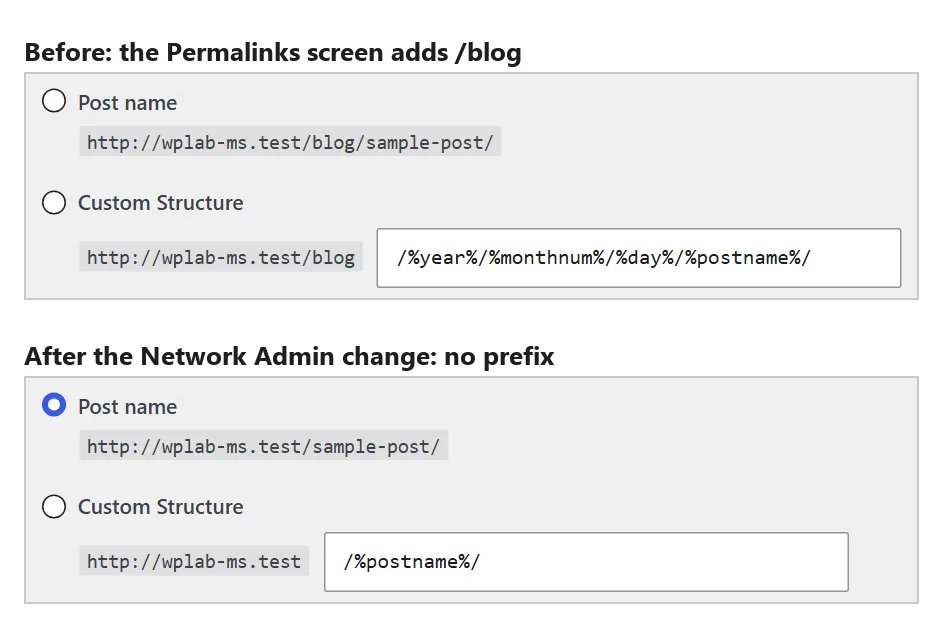
The Permalinks screen won’t do it. On the main site of a subdirectory network, Settings > Permalinks shows /blog as fixed text in front of the custom field, and whatever structure you pick is saved with the prefix.
The field that works is in Network Admin:
- Go to Network Admin > Sites and click Edit under the main site.
- Open the Settings tab and find the field labelled
permalink_structure. This tab lists the site’s stored options by their raw database names, not by friendly labels, so search the page for that name. - Change
/blog/%postname%/(or the dated version) to/%postname%/and click Save Changes. - Open the main site’s Settings > Permalinks. You don’t need to change anything; clicking Save Changes does no harm.

Step 4 matters. The Network Admin settings tab writes each field straight to the database and does nothing else; it doesn’t rebuild the rewrite rules. On our test network, right after step 3, the post’s new address /hello-world/ returned 404. Simply opening the Permalinks screen fixed it, because that screen calls flush_rewrite_rules() every time it loads: /hello-world/ returned 200, and the old /blog/hello-world/ answered with a 301 redirect to the new address. Old links keep working. From the command line, wp rewrite flush does the same.
Change the field, then open Permalinks once. The new addresses don’t exist until you do.
Does WordPress put /blog back?
A common worry is that WordPress quietly puts /blog back. We checked both places that could.
The Permalinks screen doesn’t. Its code only adds the prefix when the stored structure already starts with /blog/. Once you’ve removed it in Network Admin, the screen shows no prefix and saves exactly what you choose. On our test network, after the change, the screen showed plain /sample-post/ addresses, and saving it kept /%postname%/.
WP-CLI does. wp rewrite structure adds /blog on a main site every time, even after you’ve removed it. On the test network, wp rewrite structure '/%postname%/' stored /blog/%postname%/. If you manage permalinks from the command line, set the option directly:
wp option update permalink_structure '/%postname%/'
wp rewrite flushCode language: Bash (bash)
Another fix you may come across is a “lock” snippet that strips /blog/ whenever the option is saved. We tested it as a must-use plugin and it does work, including against WP-CLI. You only need it if someone on your team uses wp rewrite structure. Its last line, register_activation_hook( __FILE__, 'flush_rewrite_rules' ), never runs from a snippet, because a snippet isn’t a plugin file that gets activated. Flush the rules yourself.
The collision WordPress stops catching
With /blog gone, a main-site post and a subsite can want the same address, and the subsite always wins. We published a main-site post with the slug alpha on our test network. WordPress gave it the permalink /alpha/, which serves subsite alpha’s home page. The post was unreachable, and nothing warned anyone.
WordPress has some guards, but they’re partial. This is what each route did on a WordPress 7.0.2 test network; the last two rows come from reading the source rather than running it:
| What you do | Guard | Result |
|---|---|---|
| Publish a main-site page from a save that loads wp-admin (the Classic Editor, or WP-CLI) | avoid_blog_page_permalink_collision | slug renamed with a random digit (beta became beta9, then beta2) |
| Publish a main-site page through the REST API, which the block editor uses | none: that guard only loads on admin screens | slug beta, permalink /beta/, subsite answers |
| Publish a main-site post, any way | none | slug alpha, permalink /alpha/, subsite answers |
| Create a subsite named like an existing main-site page, via public signup | blocked | “Sorry, you may not use that site name.” |
| Create a subsite from Network Admin > Sites > Add New | only the reserved-names list | an existing post or page with that name is shadowed |
Two of those are easy to miss. The page guard is real, but it loads only for saves that run inside wp-admin, and the block editor saves through the REST API; in our test, a page saved that way kept its colliding slug. And the Add New Site screen, the one a network admin actually uses, checks only a short reserved list (page, blog, files, feed, wp-json and a few others), not your existing posts or pages.
The subsite always wins, and nothing tells the post it lost.
The check to run instead
Before you remove /blog, and again whenever you add a subsite, look for main-site content whose slug matches a site path. With WP-CLI, from the main site:
for path in $(wp site list --field=path); do
  name=$(echo "$path" | tr -d /)
  [ -n "$name" ] && wp post list --post_type=post,page --post_status=any --name="$name" --fields=ID,post_type,post_status,post_name
done
Code language: Bash (bash)
Any row it prints is a post or page that a subsite is hiding, or will hide. On our test network it printed the alpha post and nothing else. Rename the post, or pick a different name for the site.
No WP-CLI access? The same check works over the REST API: list the network’s site paths, then search the main site’s posts and pages for each name. If you write content in files and publish it with a script, add the site paths to whatever slug check runs before publishing, so a new post can’t take one of them by accident.
Should you remove it at all?
Keep /blog if your network lets people create sites themselves. Every new sign-up is a name that could collide with a post you haven’t written yet, and the prefix makes that impossible for the cost of five characters.
Remove it when the network is small and an administrator creates every site, which is how most business networks run: a main site with a handful of sections or brands. Then the shorter address is worth having, and the check above is cheap. If you also move domains around, the search-and-replace layers in a domain migration are worth reading first, and running snippets per site rather than network-wide keeps fixes like the lock snippet from reaching sites that don’t need them.
The short version
WordPress adds /blog to a multisite main site because a subsite path always beats a post slug. Remove it in Network Admin > Sites > Edit > Settings, then open Settings > Permalinks once to rebuild the rules; old /blog links redirect. The Permalinks screen won’t put the prefix back, but wp rewrite structure will. After removal, WordPress only partly stops slug collisions, so check main-site slugs against site paths whenever you add a site.
Frequently Asked Questions
Does a subdomain network have the same problem?
No. On a subdomain network each site has its own host name (shop.example.com), so a main-site post can never share an address with a subsite. WordPress doesn’t add /blog there, and none of the guards above apply.
Is the /blog prefix bad for SEO?
Not in itself. Search engines read URLs as addresses, and a short prefix doesn’t hold a post back. Remove it because you want shorter, cleaner addresses, and do it before the site is indexed if you can, so the 301 redirects have less to carry.
My network was set up years ago. Is it too late to remove /blog?
No. The redirect from the old addresses is automatic once the rules are flushed. Run the collision check first, because an older network has more posts and more subsites that could already share a name.

