Your site has one contact form, yet every page downloads Contact Form 7’s stylesheet, two scripts and a block of settings. The plugin has its own switch for that. The catch is the form that isn’t in the page content.
wpcf7_load_js and wpcf7_load_css filters, then load the files again in two places: in the head of any page whose content holds a form, and wherever a form is actually printed outside the content, such as a widget, a popup or a theme template. Judge the second case by the form’s final HTML, so a form another plugin replaces loads nothing. Purge the page cache, then check a page with a form and one without.Table of Contents
Check what each page loads
Open a page that has no form, view its source, and search for wpcf7. On a test site with Contact Form 7 6.1.6 and nothing else changed, every page carried the same four tags, form or no form:
page                  form  CF7 tags  files
home                  no    4         28.3 KB
sample page           no    4         28.3 KB
contact (form)        yes   4         28.3 KB
help (footer form)    yes   4         28.3 KB

contact-form-7-css 2.9 KB · swv-js 12.2 KB · contact-form-7-js-before (inline) · contact-form-7-js 13.1 KBCode language: CSS (css)
The sizes are uncompressed. Your server’s compression makes them smaller over the wire, but the browser still makes the requests, and the stylesheet blocks rendering until it arrives. The browser’s Network panel shows the same thing: filter by contact-form-7.
One contact page, and every visitor to every other page pays for its scripts.
Turn the site-wide loading off
Contact Form 7 asks two filters before it adds its files. Return false from both and it stops loading them everywhere. The plugin documents this on its own page about loading JavaScript and stylesheet only when necessary. If you prefer wp-config.php, the constants WPCF7_LOAD_JS and WPCF7_LOAD_CSS set to false do the same.
On its own this breaks every form, so the next step comes with it: load the files again where a form needs them. The common version checks the page’s own content:
add_filter( 'wpcf7_load_js', '__return_false' );
add_filter( 'wpcf7_load_css', '__return_false' );

add_action( 'wp_enqueue_scripts', function () {
    if ( ! is_singular() || ! function_exists( 'wpcf7_enqueue_scripts' ) ) {
        return;
    }
    $content = (string) get_post_field( 'post_content', get_queried_object_id() );
    if ( has_shortcode( $content, 'contact-form-7' )
        || has_block( 'contact-form-7/contact-form-selector', $content ) ) {
        wpcf7_enqueue_scripts();
        wpcf7_enqueue_styles();
    }
}, 20 );
Code language: PHP (php)
This loads the files in the head, before the page renders, on any page or post whose content holds the shortcode or the Contact Form 7 block. On the test site it took the files off the home and sample pages and kept them on the contact page. It also took them off the help page, which still shows a form.
The form that isn’t in the page content
The help page’s form comes from the site’s footer, not from the page content. The same happens with a form in a widget, a popup, a theme template or a product tab. A content check can’t see any of those, so the page printed a form with none of its files.
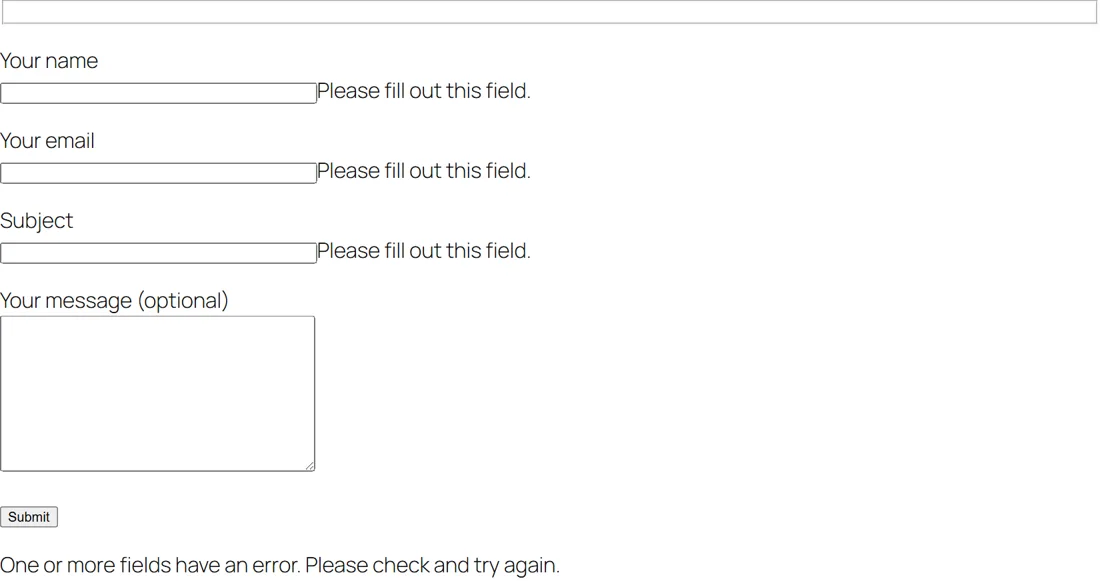
The form still worked, after a fashion. Submitting it empty reloaded the whole page, and the errors came back unstyled:
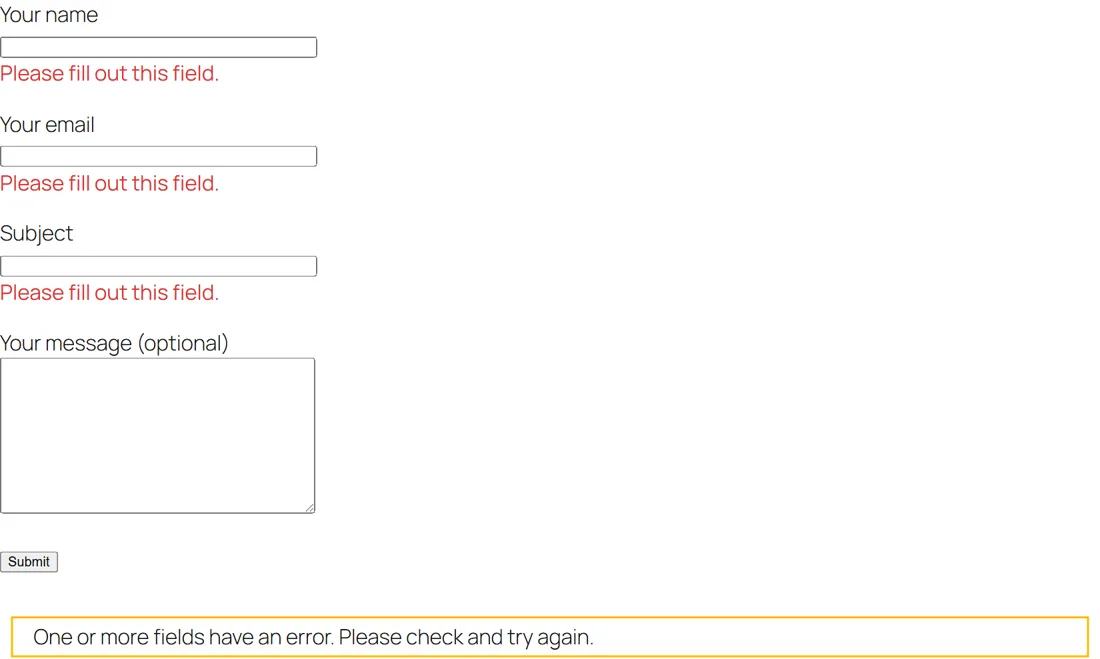
With its scripts, the same empty submit stays on the page and shows the plugin’s own messages:
If a form can appear outside the content, a content check will miss it.
Load Contact Form 7 scripts wherever a form is printed
Contact Form 7’s form HTML always carries the class wpcf7-form. So check the final output of the shortcode and the block, and load the files whenever a form is really there. Add this below the code above:
// Wherever a form is actually printed (a widget, a popup, a template), load the files then.
function example_cf7_enqueue_if_form( $html ) {
    if ( function_exists( 'wpcf7_script_is' ) && false !== strpos( (string) $html, 'wpcf7-form' ) ) {
        if ( ! wpcf7_script_is() ) {
            wpcf7_enqueue_scripts();
        }
        if ( ! wpcf7_style_is() ) {
            wpcf7_enqueue_styles();
        }
    }
    return $html;
}
add_filter( 'do_shortcode_tag', function ( $output, $tag ) {
    return 'contact-form-7' === $tag ? example_cf7_enqueue_if_form( $output ) : $output;
}, 99, 2 );
add_filter( 'render_block', function ( $html, $block ) {
    return 'contact-form-7/contact-form-selector' === ( $block['blockName'] ?? '' )
        ? example_cf7_enqueue_if_form( $html ) : $html;
}, 99, 2 );
Code language: PHP (php)
do_shortcode_tag runs after a shortcode has produced its HTML, and render_block does the same for blocks. Priority 99 puts this check after other plugins’ filters. That matters when a plugin replaces the form, for example with a “log in to send a report” link for visitors who aren’t signed in. The test site’s sample page had exactly that, and with this check it loaded nothing, because no form reached the page. A check that runs when Contact Form 7 starts drawing the form would have loaded the files for a form nobody sees.
On the test site, with both parts in place:
page                  form  CF7 tags  files
home                  no    0         0 KB
sample page           no    0         0 KB    (form replaced by a login link)
contact (form)        yes   4         28.3 KB in the head
help (footer form)    yes   4         28.3 KB printed with the formCode language: CSS (css)
On pages where the form sits outside the content, the stylesheet arrives with the form rather than in the head, so a slow connection can show the form unstyled for a moment. Where that matters, put the form in the page content, or add that page to the content check by its ID.
Where to put the code: a snippet plugin set to run on the front end, a child theme’s functions.php, or a small plugin of your own. The trade-offs between those are in code snippet or plugin.
Purge the cache, then measure
A page cache keeps serving the old HTML, with every script tag still in it, until you purge it. Purge, then load a page without a form and one with a form, and look for wpcf7 in the source again. Then send a real message through each form, because the scripts are what submit it without a reload.
On a live WordPress site, the same change measured with PageSpeed Insights, three runs each from the page cache:
| Page | Score (mobile) | Largest Contentful Paint | Requests | Page weight |
|---|---|---|---|---|
| Home | 95 → 96 | 2.01 s → 1.84 s | 38 → 33 | 369 KB → 352 KB |
| A content page | 94 → 95 | 2.08 s → 2.04 s | 50 → 44 | 350 KB → 332 KB |
Desktop scores stayed within run-to-run noise, since they were already near 100. A point on mobile isn’t dramatic, but it costs nothing to keep, and it’s one fewer render-blocking stylesheet on every page. More ways to cut page weight are in the WordPress speed optimization guide.
Load the form’s scripts where the form is, and nowhere else.
A plugin instead of code
Asset manager plugins such as Asset CleanUp let you unload Contact Form 7’s files per page or site-wide from a settings screen, without code. Rules set by page have the same blind spot as the content check: if a form appears somewhere you didn’t list, it loses its scripts. After setting the rules, test every page that can show a form, including popups and widgets.
The short version
- Contact Form 7 loads its CSS and JavaScript on every page by default, form or no form.
- Its
wpcf7_load_jsandwpcf7_load_cssfilters turn that off site-wide. - Load the files again in the head where the page content holds a form, and wherever a form’s final HTML is printed outside the content.
- Check the final output, so a form another plugin replaced loads nothing.
- Purge the page cache, then check a page with a form and one without, and send a real message.
Frequently Asked Questions
Will this break emails from my contact form?
No. Sending happens on the server once the form is submitted, and every page that shows a form still gets the scripts that submit it. If messages don’t arrive at all, the cause is elsewhere: see Contact Form 7 emails going to spam.
Does it work with the Contact Form 7 block in the block editor?
Yes. The content check looks for the block as well as the shortcode, and the render_block filter catches the block wherever it’s printed, including in a block theme’s templates.
Can I load the scripts only on the contact page by its slug instead?
You can, with is_page( 'contact' ) in place of the content check. It’s simpler, and it misses every form you add later on another page, plus any form in a widget or popup. Checking for the form itself keeps working as the site changes.

